If you've been part of the Backpack ecosystem, you may have a BP allocation waiting for you. Here's everything you need to know about checking your eligibility, claiming your tokens, and understanding what comes next.
Step 1: Check Your BP Allocation
Log in to your Backpack account on desktop web, then visit backpack.exchange/bp-claim to see if you have any BP allocated to your account.
If you haven't already, connect your MadLad to receive 1,000 BP allocation per Lad. The MadLad must be linked by the wallet that held it at the time of snapshot.
What Happens After You Claim
Once you claim your BP, you'll see a message explaining the staking mechanics:
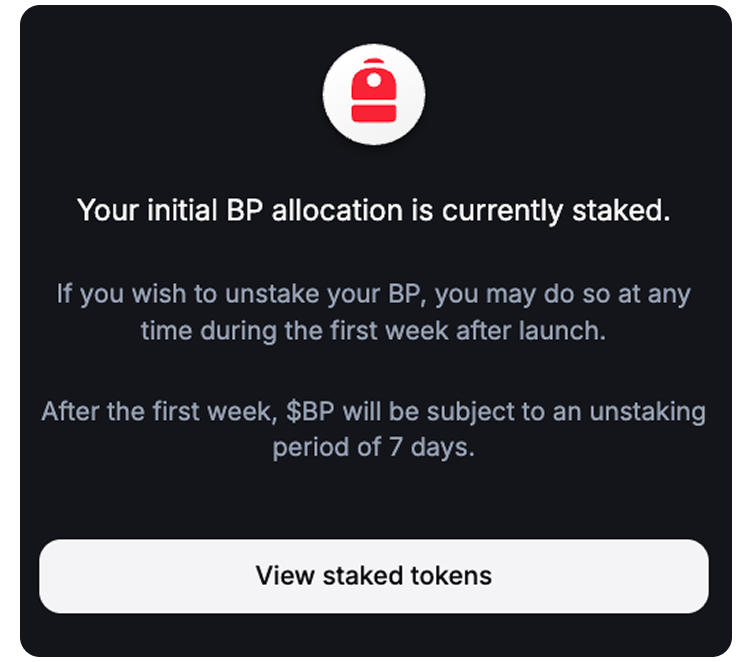
Your initial BP allocation is automatically staked. If you want to unstake, you have a one-week window after launch to do so instantly. After that first week, unstaking requires a 7-day waiting period.
This design rewards long-term participants while still giving everyone flexibility to access their tokens if needed.
Understanding the BP Staking Dashboard
After claiming, click View Staked Tokens to access your dashboard at backpack.exchange/bp.

The interface displays your current position across three categories: available BP balance, staked balance, and any tokens pending unstake. It also shows your share of the reserved equity pool, which is fully allocated for participants who stake. Without staking, you won't have access to this pool.
Benefits of Staking BP
The Backpack Participant Program operates as a tiered incentive system. The more BP you stake and the longer you hold, the more benefits you unlock.
Active benefits include:
- Reduced trading fees that improve as you move up tiers
- Discounted or free wire transfers for fiat on/off ramping
- Equity exchange access, allowing you to use staked BP toward purchasing Backpack equity
- Enhanced yield on USD collateral (coming soon)
Upcoming benefits:
- Early access to the Backpack card
- Lower fees on prediction markets
- Priority access to IPOs before public trading
- Enhanced wallet benefits for self-custody users
The Backpack Participant Program is designed to reward active users across trading, payments, equity participation, and future product launches. Staking your BP positions you to access reduced costs and exclusive opportunities as the ecosystem expands.
Learn more about Backpack
Exchange | Wallet | Twitter | Discord | Reddit
Disclaimer: This content is presented to you on an “as is” basis for general information and educational purposes only, without representation or warranty of any kind. It should not be construed as financial, legal or other professional advice, nor is it intended to recommend the purchase of any specific product or service. You should seek your own advice from appropriate professional advisors. Where the article is contributed by a third party contributor, please note that those views expressed belong to the third party contributor, and do not necessarily reflect those of Backpack. Please read our full disclaimer for further details. Digital asset prices can be volatile. The value of your investment may go down or up and you may not get back the amount invested. You are solely responsible for your investment decisions and Backpack is not liable for any losses you may incur. This material should not be construed as financial, legal or other professional advice.
.avif)