

Popular Portfolios is a free research tool on Backpack that visualizes the holdings of well-known investors, funds, and institutions based on their public SEC 13F filings. Instead of reading raw regulatory documents, you can see each portfolio's actual allocation, how it changed quarter over quarter, and which positions were added, trimmed, or exited entirely. The data updates every quarter as new filings are reported, and every Backpack user can access it at no cost.
What is Popular Portfolios
Every quarter, large institutional investors in the United States must disclose their equity holdings to the SEC. This information is public, but it arrives as dense regulatory filings that most people never open.
Popular Portfolios turns those filings into something you can actually use. For each investor or fund covered, Backpack shows:
- The current portfolio allocation, so you can see what they hold and how much weight each position carries
- Quarter-over-quarter changes: new positions, increases, reductions, and full exits
- How the portfolio's reported value and position count have evolved across years of filings
- How actively each fund trades, measured by portfolio turnover and average holding period
Whether you follow a legendary stock picker like Warren Buffett or want to see where institutional money is rotating as a whole, Popular Portfolios gives you a clear view without digging through filings yourself.
Where the data comes from: 13F filings
The source of truth behind Popular Portfolios is the SEC Form 13F. Institutional investment managers with at least $100 million in US equity assets must file this form within 45 days after the end of each calendar quarter, disclosing the US-listed stocks they held on the last day of that quarter.
Because 13F filings are mandatory and standardized, they are the most reliable public window into what major investors own. Backpack does not estimate or model these positions. Every portfolio you see is built directly from reported filings.
Three limitations are worth knowing before you read any portfolio:
- Reporting lag. Filings show holdings as of the quarter's last day and can arrive up to 45 days later. By the time a filing becomes public, the fund may have already changed its position.
- Long positions only. 13F filings cover US equity holdings. They do not show short positions, most derivatives, or non-US assets. For a long-only investor like Warren Buffett, the filing captures nearly the full picture. For a hedge fund, it shows only one side of the book.
- Occasional exceptions. The SEC can grant confidential treatment that lets a manager delay disclosing a position it is still building. Even a complete filing may briefly omit a stake that is disclosed in a later amendment.
None of this makes 13F data less valuable. It simply means the data rewards careful reading, which is exactly what the sections below cover.
How to access Popular Portfolios
- Log in to your Backpack account
- Open the Stocks section
- Select Popular Portfolios
- Choose an investor or fund to open their portfolio page
Before opening any portfolio, you can already compare funds from the overview: see how large each fund is, how many positions it runs, and how much it changed in the latest quarter. A fund showing dozens of adds and removals is trading actively, while one with a single change is holding steady, so the overview itself tells you where something interesting happened this quarter.
You do not need to hold any assets or meet any requirements to use the feature. Every Backpack user can browse all covered portfolios for free.
How to read a portfolio page
Every portfolio page follows the same layout, from the summary at the top to the full holdings list at the bottom. Here is how to read each part.
The four numbers at the top
Each page opens with four stat cards:
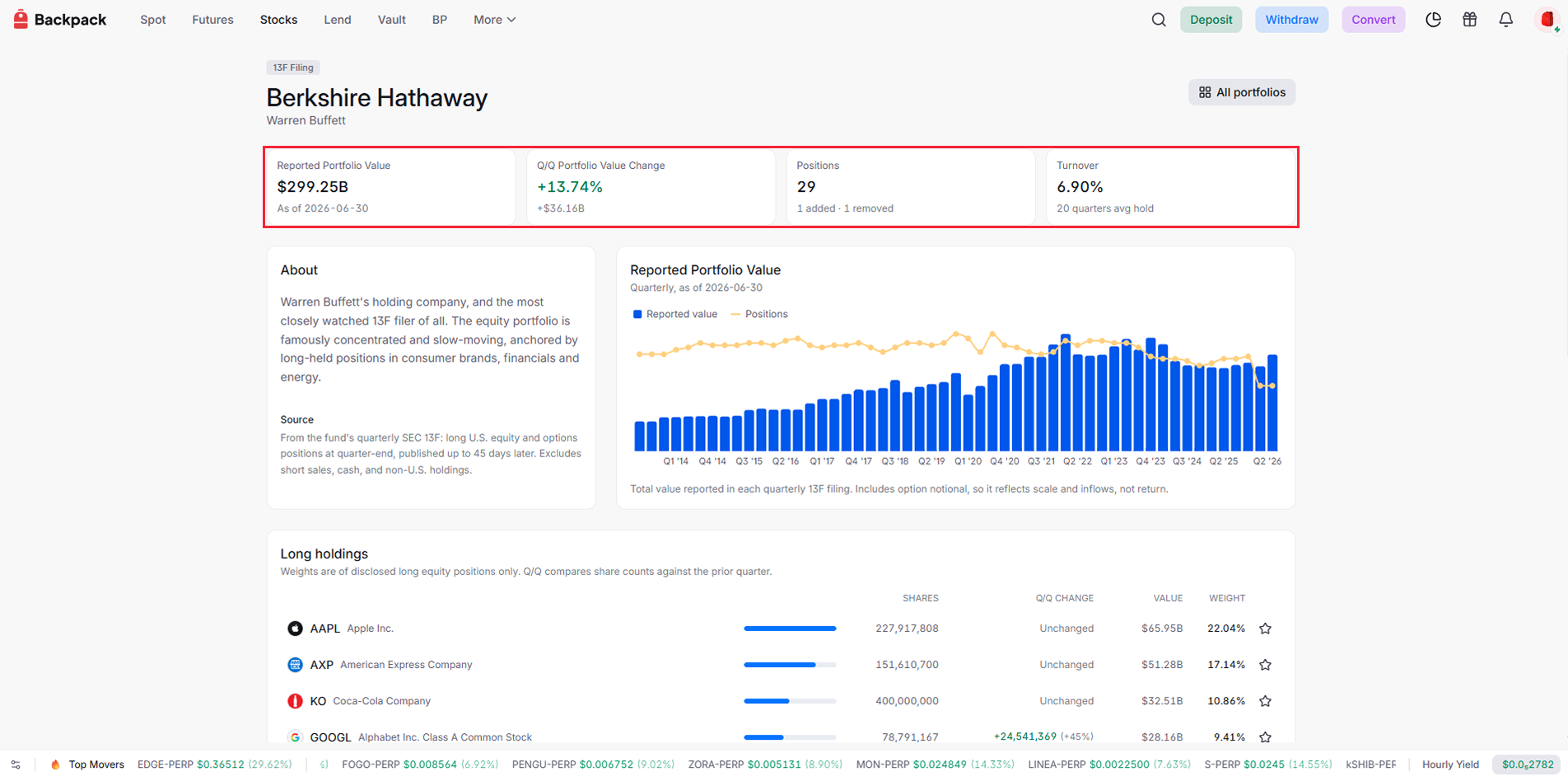
Each page opens with four stat cards:
Reported Portfolio Value is the total value of the fund's disclosed positions as of the latest quarter's end. It tells you the scale you are looking at: a fund managing hundreds of billions and a fund managing a few billion move markets very differently.
Q/Q Portfolio Value Change shows how much that value moved since the previous filing. One caution before you read anything into it: a rising portfolio value does not mean the fund made money. Value can grow because prices went up, because new money flowed in, or both. Treat it as a measure of scale, not investment return.
Positions counts the fund's disclosed holdings, along with how many were added and removed this quarter.
Turnover measures how actively the fund trades, shown with its average holding period. This one number changes how you should read everything below it. A fund that holds its positions for years almost never trades, so when it does make a change, that change carries weight. A fund that replaces half its book every quarter makes changes constantly, so no single move means much on its own.
About and Source
Below the stats, each page describes the fund and its manager, and states exactly what the data covers and excludes. If you are looking at a fund you do not know, read this first. Knowing whether you are looking at a concentrated activist fund or a broad institutional manager changes what every number below means.
The portfolio value chart
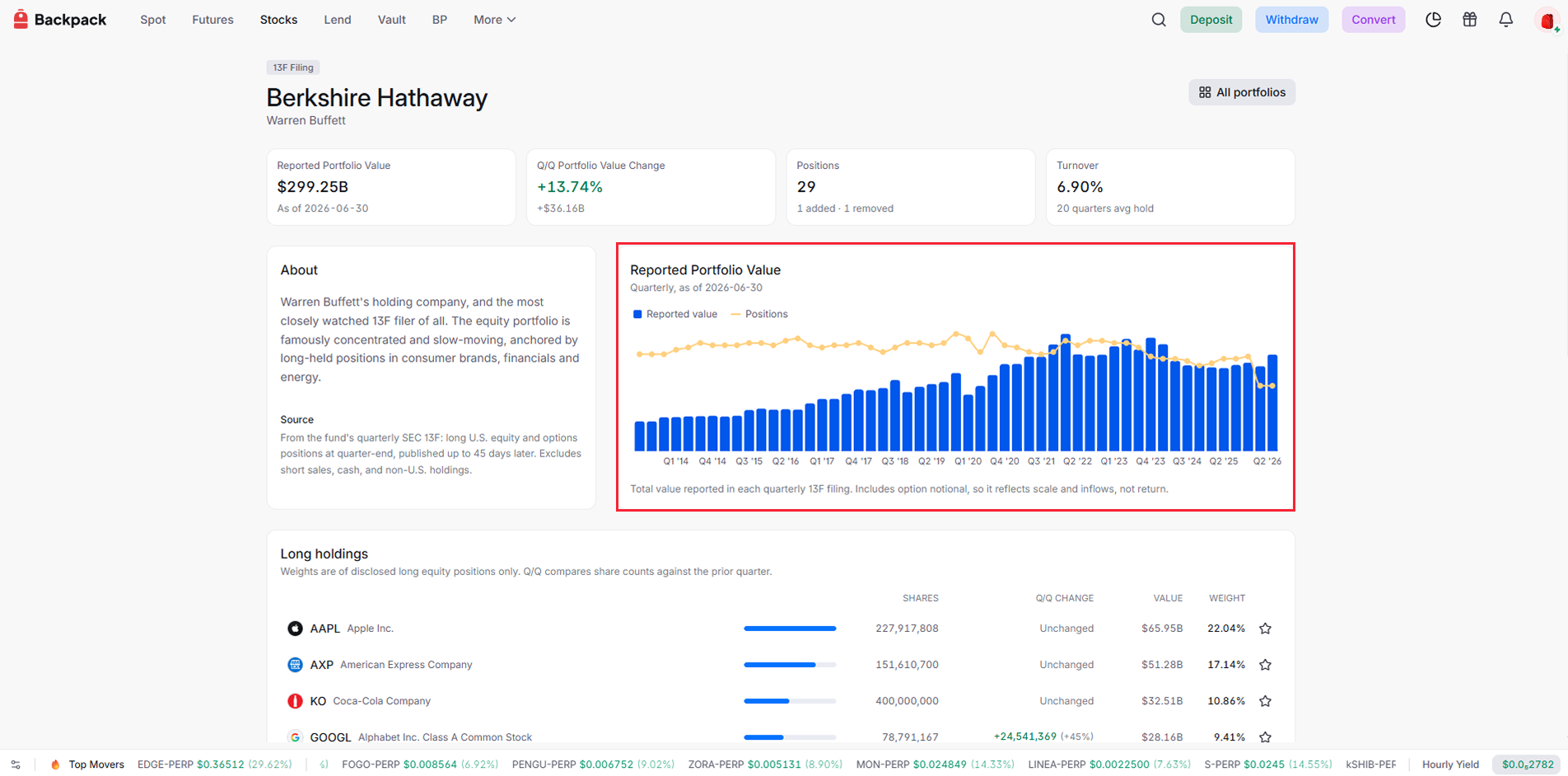
This chart answers a question no single filing can: how did this fund get to where it is today? Some funds carry more than a decade of filing history, so you can see whether the manager built the portfolio steadily, in bursts, or through sharp reversals. Hover over any quarter to check the exact value and position count at that point.
The one mistake to avoid: a growing chart does not mean a winning fund. Reported value includes option notional and rises when prices go up or when new money flows in, so growth here means the portfolio got bigger, not that it performed well.
What rewards attention is the gap between value and position count. A fund whose value keeps climbing while its positions shrink is concentrating, betting bigger on fewer ideas. A fund adding positions as it grows is spreading out. That shift in style is often more revealing than anything a single quarter shows.
The holdings table
Everything above summarizes the fund. The holdings table is where you see the actual bets.
Start with concentration. When the top few holdings carry most of the portfolio's weight, you are looking at a high-conviction manager, and each of those positions reflects a deliberate bet. When the weight is spread thin across hundreds of names, no single holding tells you much on its own.
Then look at the Q/Q Change column, and note what it compares: share counts against the prior quarter, not dollar values. The distinction matters more than it looks. If a stock rises sharply in a quarter, its dollar value in the portfolio grows even if the fund never bought a single share. Share count tells you what the investor actually did. Value tells you what the market did. When the column says Unchanged, the fund ended the quarter with the same share count it started with, whatever the price chart looked like.
Reading down that column, every move a fund made falls into one of four kinds:
- New: stocks that were not in the previous filing
- Increases: existing holdings the fund added to
- Reductions: holdings that were trimmed
- Exits: positions sold out completely
Changes often say more than the holdings themselves. A full exit from a long-held position, or a large new stake from a fund that rarely trades, is usually where the real signal is.
Add holdings to your watchlist
Every holding in every portfolio has a star button at the right. One click sends that stock to your Backpack watchlist.
This turns Popular Portfolios into a discovery tool. Browse the portfolios of investors you respect, and when you spot a stock you did not expect, or one you have been hearing about, star it. You are building a research list out of the actual picks of the world's most watched investors, and the watchlist is where you dig in later and decide whether any of them belong in your own book.
Open a portfolio you are curious about and start starring. That is someone else's filing becoming the start of your own research.
What you can do with Popular Portfolios
Follow the investors you already watch. If you read the news whenever Warren Buffett moves, this is where you check what he actually did instead of what headlines say he did. The share count column settles it: a position that "grew" on price alone shows Unchanged, and a real buy shows the added shares. Each new quarter, the answer is one page away.
Look inside funds you keep hearing about. When a fund is all over your feed but you have no idea what it actually owns, its portfolio page is the fastest reality check. Read the About section for who is behind it, check the turnover to see whether it trades on conviction or momentum, then scan the top weights. Ten minutes of that beats any thread about the fund.
Spot moves that agree with each other. One fund adding a stock is a data point. Several funds adding the same stock, or the same sector, in the same quarter is a pattern worth your attention. Because every portfolio page follows the same layout, checking a hunch across five funds takes minutes, and starring the names that keep showing up builds you a research list of what institutions are quietly converging on.
Whatever you find here is a starting point, not a signal. Filings arrive up to 45 days late, a position can serve purposes a filing does not show, and what fits a hundred-billion-dollar book may not fit yours. Popular Portfolios tells you what serious investors did with their money. What you do with yours is your own research.
When is the data updated
Portfolios follow the SEC reporting cycle. Funds must file within 45 days after each quarter ends, and most file close to that deadline, so fresh data tends to arrive in a wave about a month and a half into each new quarter:
Each portfolio updates when its own fund files, so during filing season you may see some funds already showing the new quarter while others still show the previous one. That is not stale data; it simply means that fund has not filed yet.
You do not need to track any of this yourself. Backpack announces when portfolios refresh with new filings, so you will know as soon as updated data is live.
Learn more about Backpack
Exchange | Wallet | Twitter | Discord | Reddit
Disclaimer: This content is presented to you on an “as is” basis for general information and educational purposes only, without representation or warranty of any kind. It should not be construed as financial, legal or other professional advice, nor is it intended to recommend the purchase of any specific product or service. You should seek your own advice from appropriate professional advisors. Where the article is contributed by a third party contributor, please note that those views expressed belong to the third party contributor, and do not necessarily reflect those of Backpack. Please read our full disclaimer for further details. Digital asset prices can be volatile. The value of your investment may go down or up and you may not get back the amount invested. You are solely responsible for your investment decisions and Backpack is not liable for any losses you may incur. This material should not be construed as financial, legal or other professional advice.