Your stock holdings can support more than a long-term investment position. On Backpack, eligible shares can serve as collateral to borrow USD, trade spot on margin, open perpetual futures positions or hedge stock exposure.
This means you can keep your shares while using part of their value to support other activity within the same account. Here’s how stock collateral works and how to use it.
Key Takeaways
- Eligible shares contribute to your collateral: their collateral weight determines how much of their value counts toward your account’s margin.
- Stock collateral supports several uses: borrow USD, trade spot on margin or trade perpetual futures, including equity perps used for hedging.
- Available capacity depends on the whole subaccount: existing borrowing, positions and orders affect how much additional activity your collateral can support.
How Does Stock Collateral Work on Backpack?
Eligible shares contribute collateral alongside other supported assets in your account. That collateral helps meet the requirements for borrowing and trading, so you do not need to sell the shares first.
If you use multiple subaccounts, the collateral supporting a borrow or trading position must be held in the same subaccount as that activity.
Where to Check Your Stock Collateral
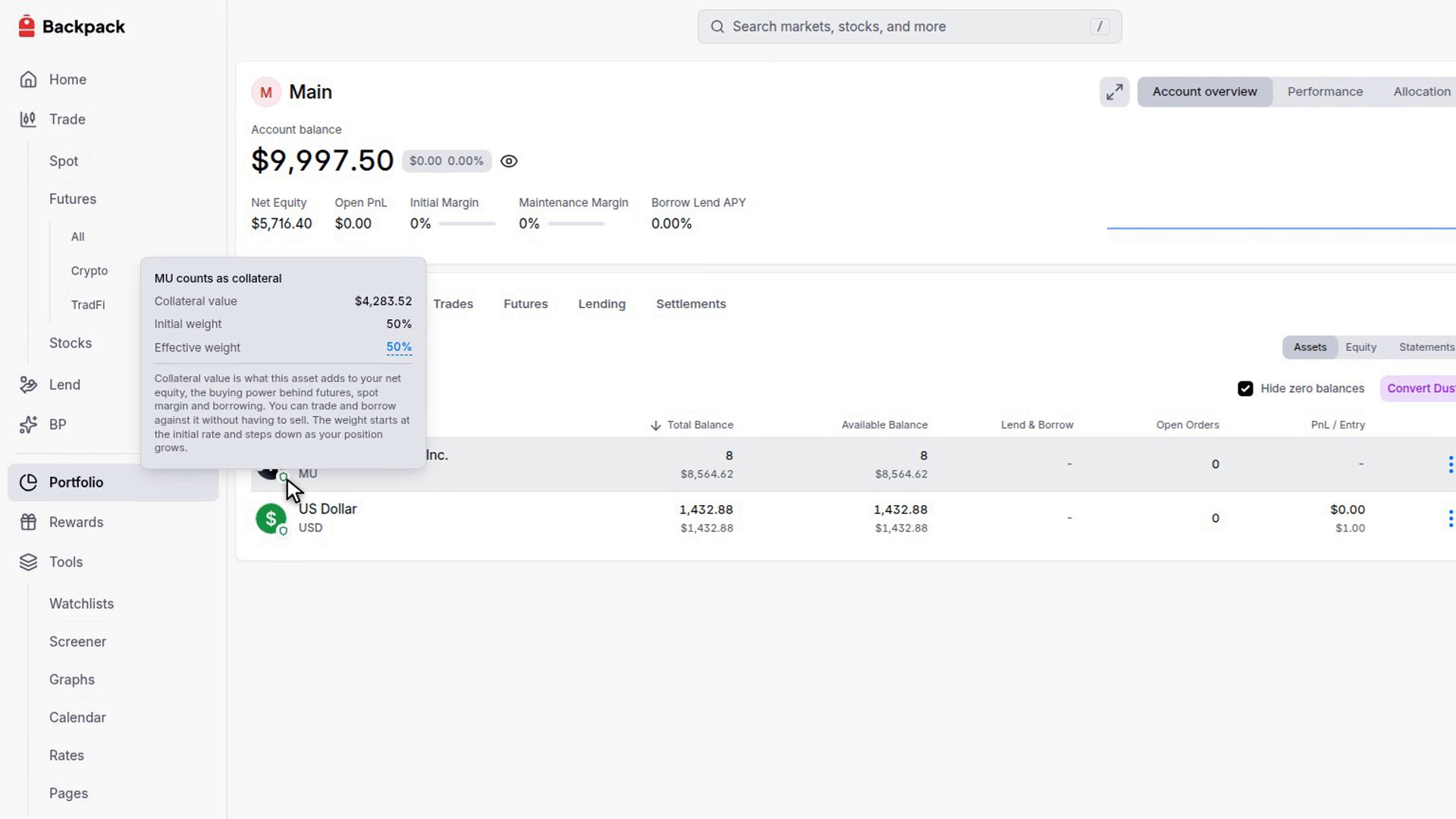
Go to Portfolio, then open the Balances tab and find your stock holding. A shield on the asset’s icon indicates that it counts as collateral.
Hover over the shield to open its tooltip. The tooltip shows:
- Collateral value: the amount the holding contributes to your account’s margin equity.
- Initial weight: the starting collateral weight for that asset.
- Effective weight: the weight currently applied to your holding.
This is the place to check how much a particular stock contributes before using it to support another position.
Understanding Collateral Value and Available Equity
Collateral weight determines the proportion of an asset’s value that counts as collateral.
For example, suppose you hold $1,000 of MU stock with an applicable collateral weight of 50%:
$1,000 × 50% = $500 in collateral value
The 50% weight is illustrative. Use the current information displayed for your holding, as weights can vary and may decrease as the collateral holding grows.
What Can You Do With Stock Collateral on Backpack?
Eligible stock holdings can support four practical uses:
Hedging is one use of perpetual futures. Its purpose is to reduce an existing exposure, while a directional perp trade expresses a view on where a market will move.
The examples below illustrate separate uses. Each assumes sufficient available capacity for the proposed activity.
How Can You Borrow USD Against Your Stocks?
Borrowing lets you access USD against eligible collateral while keeping your stock holdings. The borrowed amount becomes an available balance, with a corresponding repayment obligation.
Steps to Borrow USD
- Check your eligible shares and available equity in your account.
- For a manual USD borrow, Auto-Lend must be turned off. If you’re borrowing to buy crypto through spot margin, you can keep Auto-Lend enabled and let Backpack borrow the required amount automatically when you place the trade.
- Open the Lend page and select USD.
- Choose Borrow and enter the amount.
- Review the displayed rate and borrowing capacity, then confirm.
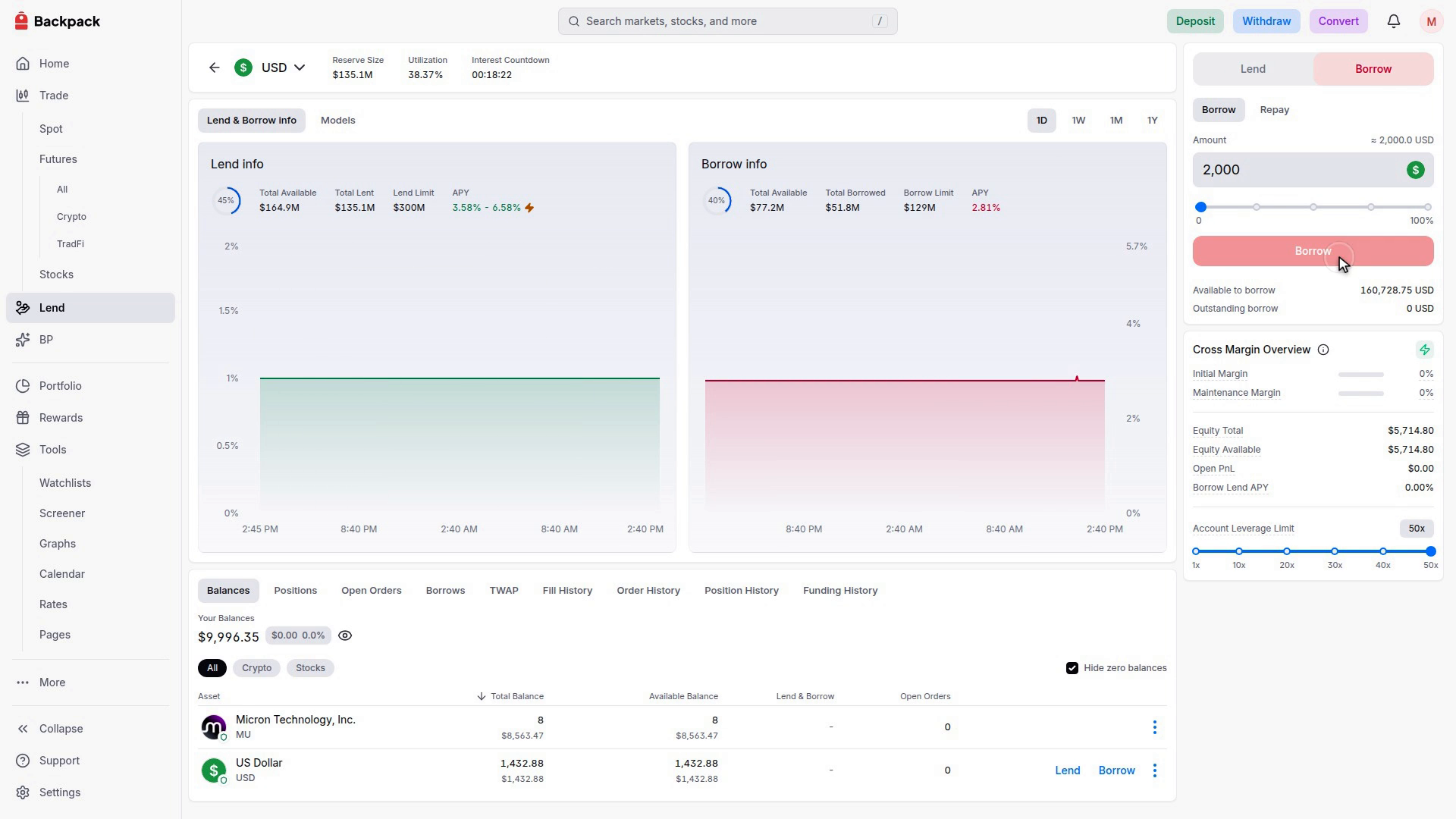
Interest accrues on the borrow. To repay manually, hold sufficient USD and select Repay in the borrowing interface. With Auto-Lend enabled, available matching balances can instead repay borrowing automatically.
How Can You Use Stocks to Trade Crypto Spot on Margin?
Eligible stock holdings can support borrowing to buy crypto beyond your available USD balance. With Margin enabled, Backpack can borrow the additional USD needed to complete the purchase while you keep your shares.
Steps to Buy Crypto on Margin
- Open the BTC/USD spot market.
- Select Market in the buy order form.
- Enter the purchase amount, such as $5,000.
- Tick Margin. If the purchase exceeds your available USD balance, the form shows how much needs to be borrowed.
- Review the borrowing amount and order details, then press Buy.
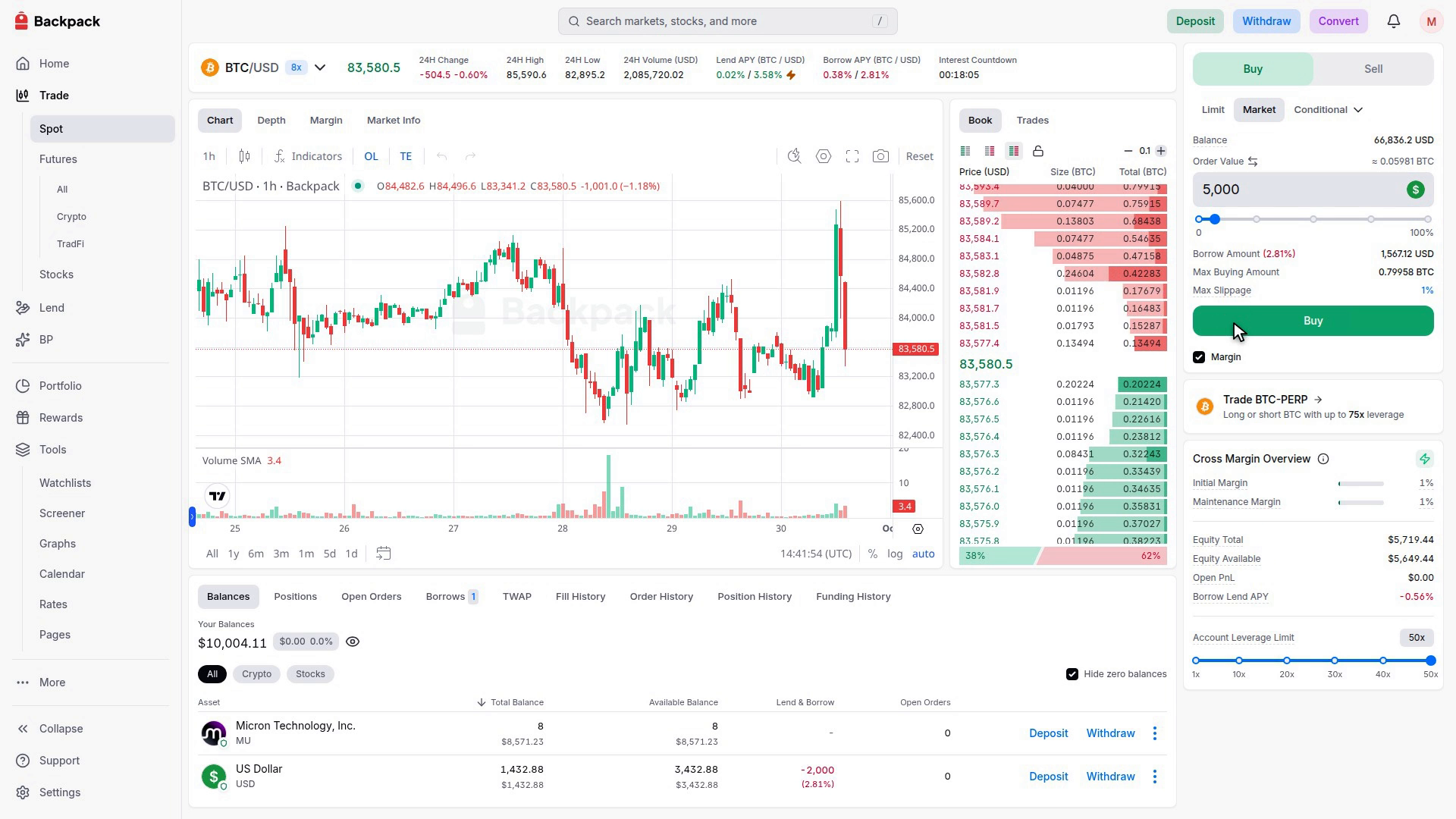
After the purchase, you hold the crypto asset and retain your shares. The borrowed USD remains an obligation on your account and accrues interest.
You can keep Auto-Lend enabled for this process. The borrowing happens through the margin-enabled trade, so a separate manual borrow is not required.
How Can You Use Stocks to Trade Perpetual Futures?
Eligible shares can help support the margin required for a perpetual futures position. You can open the position using available equity without necessarily making a separate manual USD borrow first.
Steps to Open a Perpetual Futures Position
- Open SOL-PERP and use the Buy / Long side of the order form.
- Select Market.
- Enter the order value, such as $10,000.
- Review the margin required and estimated liquidation price.
- Press Buy / Long.
- Open Positions to check the filled position.
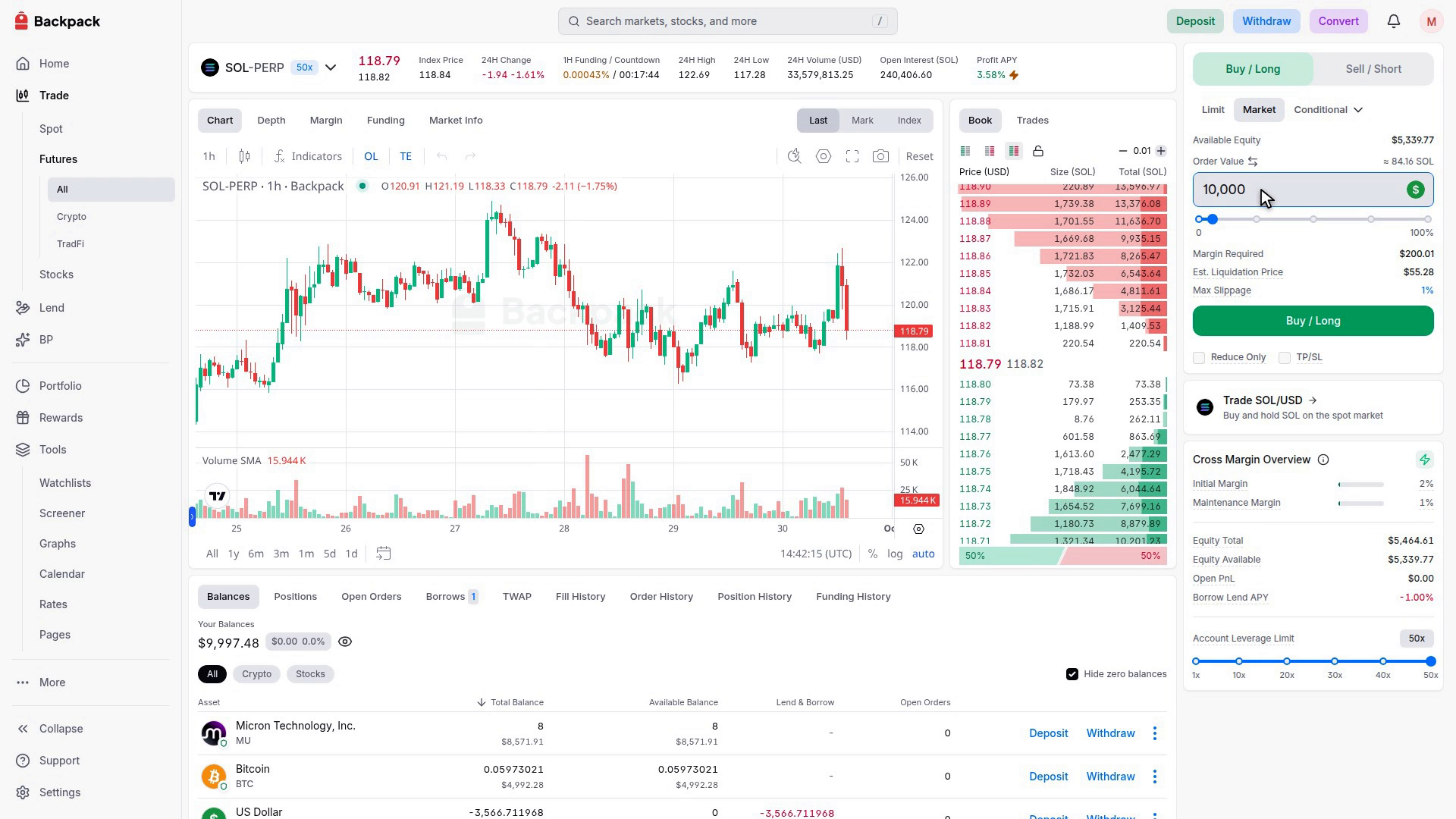
Order value represents your total market exposure. Margin Required shows how much margin is needed to support that exposure. Your eligible shares contribute to that margin while remaining in your balances.
The Estimated Liquidation Price indicates an estimated liquidation threshold under your account’s current conditions. It can change as collateral values, balances and other positions change.
How Can You Hedge Your Stocks With Equity Perps?
An equity perp short can help offset price movements in shares you already hold. This provides a way to reduce stock exposure while retaining the underlying holdings.
Steps to Hedge a Stock Holding
- Check the number of shares you want to hedge.
- Open the corresponding equity perp market, where available.
- Choose Sell / Short.
- Switch the order input to Quantity and enter the amount you want to hedge, checking the contract’s units.
- Review the order details, funding rate and margin requirements.
- Submit the order, then check the filled short under Positions. Your underlying shares remain in your balances.
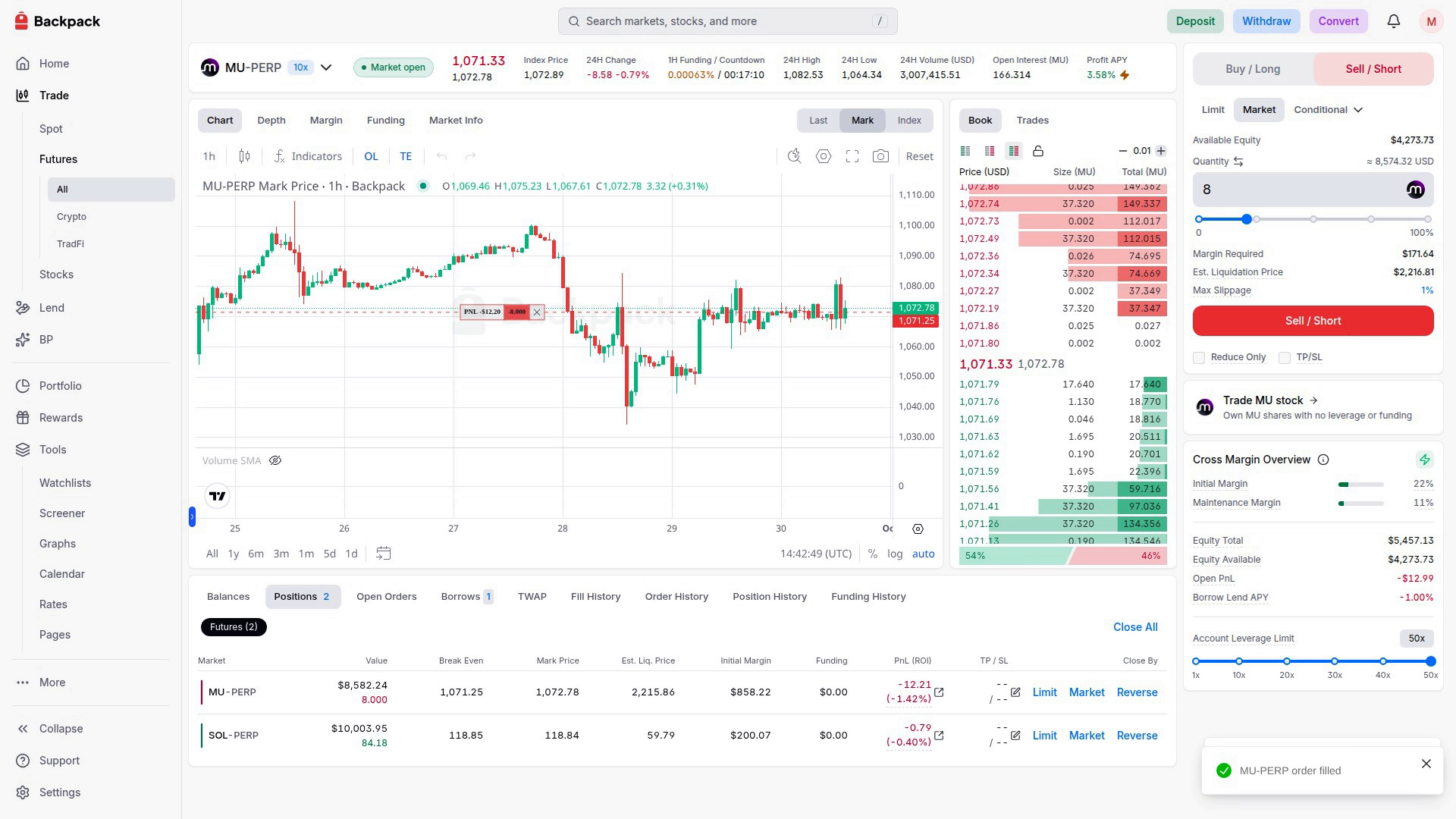
If the stock price falls, gains on the short can help offset losses on the shares. If the stock price rises, losses on the short can offset gains on the shares. The hedge therefore reduces exposure in both directions.
Equity perps can provide access outside regular stock-market hours. Funding, execution costs and differences between the stock and perp prices affect how closely the positions offset each other.
What Happens When Your Stock Collateral Changes in Value?
Your collateral contribution changes with the value of your shares. If a stock falls, it can reduce the margin supporting your borrowing and other positions, even when those positions have not moved against you.
For example, at an unchanged 50% collateral weight, a holding falling from $1,000 to $800 would contribute $400 in collateral instead of $500. This reduces the account’s margin buffer by $100.
Monitor the Cross Margin Overview, particularly after changes in stock prices or total exposure. Backpack begins liquidation when the Maintenance Margin Ratio reaches 100%, which can involve reducing positions or selling collateral. Adding collateral, repaying borrowing or reducing positions can improve margin health.
Put Your Stock Holdings to Work on Backpack
Your shares can do more than sit in your account. Use eligible stocks as collateral to borrow USD, buy crypto on margin, trade perpetual futures and hedge stock exposure, without selling your shares.
Borrowing and leveraged trading involve risk, including liquidation. Product availability varies by region.
Learn more about Backpack
Exchange | Wallet | Twitter | Discord | Reddit
Disclaimer: This content is presented to you on an “as is” basis for general information and educational purposes only, without representation or warranty of any kind. It should not be construed as financial, legal or other professional advice, nor is it intended to recommend the purchase of any specific product or service. You should seek your own advice from appropriate professional advisors. Where the article is contributed by a third party contributor, please note that those views expressed belong to the third party contributor, and do not necessarily reflect those of Backpack. Please read our full disclaimer for further details. Digital asset prices can be volatile. The value of your investment may go down or up and you may not get back the amount invested. You are solely responsible for your investment decisions and Backpack is not liable for any losses you may incur. This material should not be construed as financial, legal or other professional advice.
.png)