
What Is Pay.sh?
Pay.sh is a pay-as-you-go payment layer for APIs. It was introduced by the Solana Foundation in collaboration with Google Cloud in May 2026 as a gateway service connecting autonomous agents with paid digital services.
A better way to understand Pay.sh is not as a consumer crypto app, but as an API access layer. In a traditional API setup, billing usually comes before usage. A developer creates an account, enters payment details, generates an API key, and then starts making requests.
Pay.sh changes that order. A supported API can return a payment requirement when a request is made. The user or agent can approve the payment, send proof of payment, and continue the request.
That model is useful because AI agents often work across multiple tools. An agent may need to query a dataset, call an AI model, retrieve market data, or access blockchain infrastructure as part of a larger workflow. Requiring a separate account and billing setup for every possible service makes that workflow harder to automate.
Pay.sh is designed to reduce that friction for supported APIs. It does not remove the need for trust, spending controls, or provider-side integration. It gives agents and applications a more direct way to pay for API access when a service supports that model.
How Pay.sh Works
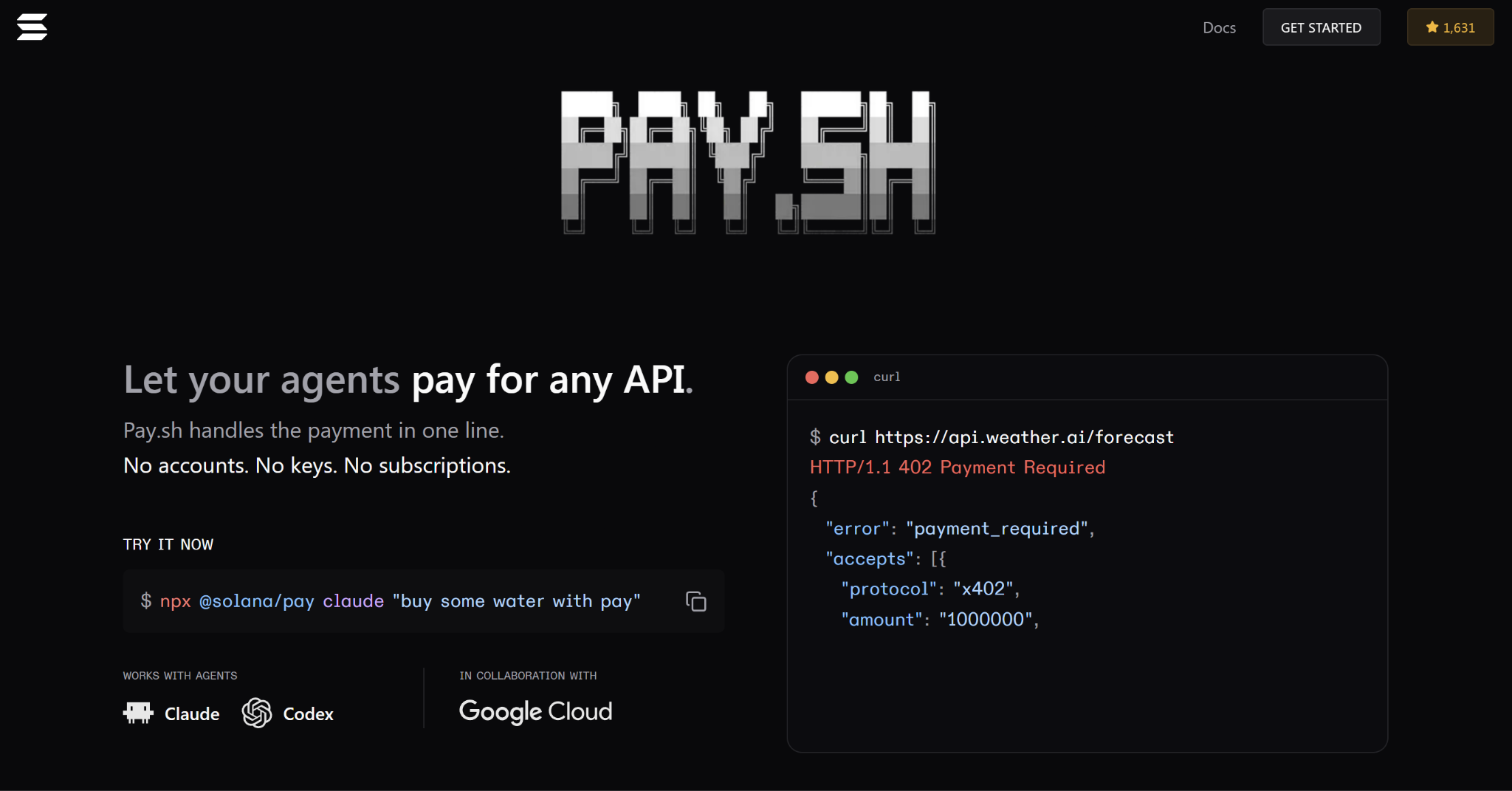
Pay.sh turns paid API access into a request-and-payment flow. The details vary by provider, but the basic pattern is straightforward:
- A developer or agent finds a supported service.
Pay.sh includes a catalog for agents, developers, and API teams. Providers can publish services in a format that software can discover, price, and call. - The API request is made.
The agent or application sends a request to a supported API. In some cases, this may happen through the Pay.sh CLI or an agent workflow connected to Pay.sh tools. - The service returns a payment requirement.
If the resource requires payment, the API can return an HTTP 402-style payment challenge. HTTP 402 is the “Payment Required” status code. - The payment is approved.
Pay.sh uses wallet-approved payments, so the user or configured wallet still plays an authorization role. This is an important distinction: Pay.sh is not simply giving agents unlimited spending power by default. - The request is retried with proof of payment.
After payment is approved, the request can be retried with payment proof. Pay.sh supports HTTP 402 payment challenges through protocols such as x402 and MPP. - The API returns the response.
Once the payment proof is accepted, the service returns the requested response. For an AI agent, that response can become one step in a larger workflow, such as analyzing data, calling another service, or generating an output for a user.
For agent workflows, Pay.sh documentation also recommends sandbox testing, provider search before payment, and caution around multi-call plans, unclear pricing, dynamic pricing, purchases, or persistent actions.
The Technology Behind Pay.sh
The technical idea behind Pay.sh is built around HTTP 402, the “Payment Required” status code.
HTTP 402 has existed for years, but it was not widely used as a standard payment flow for the web. x402 makes the idea more practical by allowing APIs to return machine-readable payment requirements. In plain terms, a service can say: this request requires payment, here is what it costs, and here is the proof needed to continue.
Pay.sh handles supported x402 payment challenges after authorization. Its documentation also notes an important distinction: x402 sign-in challenges are authentication-only and should not be described as payment settlement.
Pay.sh also supports MPP, or Machine Payments Protocol. MPP challenges are usually expressed through WWW-Authenticate and retried with an authorization credential. In practice, both x402 and MPP help with the same larger problem: giving software a structured way to respond when an API requires payment.
For most readers, the protocol names matter less than the behavior. Pay.sh gives agents and applications a way to recognize a paid request, authorize payment, retry with proof, and receive the API response.
That is why Pay.sh should not be described as only an x402 product. It is better understood as part of a broader machine-payment layer for paid digital resources.
What APIs Are Available on Pay.sh?
Pay.sh is not a single API. It is a catalog and gateway model for supported APIs.
Official Pay.sh materials describe a directory where API providers can publish services that agents can discover, price, and call. Pay.sh documentation also describes a provider catalog that helps humans and agents find gateway URLs, endpoint paths, pricing metadata, and usage notes.
The types of services that fit this model may include:
- AI models and agent tools
- Cloud services
- Data APIs
- Blockchain infrastructure
- Search and maps APIs
- Compute, storage, and media services
- Finance and market data tools
- Developer infrastructure
A realistic workflow might look like this:
- An AI research agent pulls market data.
- It queries a dataset.
- It calls a model to summarize the result.
- It checks blockchain activity.
- It returns an answer or triggers the next step in the workflow.
In a traditional setup, those steps may require several accounts, API keys, billing dashboards, and usage limits. With Pay.sh, the goal is to make supported services accessible through request-based payment instead.
This is still early infrastructure. The catalog should not be treated as a replacement for every cloud marketplace or API platform. Availability can change as providers are added, removed, or updated, so developers should check the live Pay.sh catalog before relying on a specific service.
Pay.sh vs Traditional API Billing
Pay.sh does not replace every API billing model. It is better understood as a different model for a specific use case: request-based access to supported services.
Traditional API billing still makes sense for high-volume customers, enterprise contracts, compliance-heavy services, and teams that need account management. Pay.sh is more relevant when software needs to access a paid service at the moment of use.
The simplest distinction is this: traditional API billing is account-first. Pay.sh is request-first.
What Pay.sh Is Not
Because Pay.sh sits between crypto, APIs, AI agents, and payments, it is easy to misread what it is.
- Pay.sh is not a crypto exchange.
It does not provide a marketplace for trading crypto assets. Its role is closer to an API payment gateway than an exchange. - Pay.sh is not just a wallet.
A wallet stores assets and signs transactions. Pay.sh uses wallet-approved payments, but the product is broader than a wallet. It connects API requests with payment requirements and payment proof. - Pay.sh is not a token.
Pay.sh should not be understood primarily as a token. Its main role is infrastructure for paid API access. - Pay.sh is not a normal checkout page.
Most checkout pages are built for humans. Pay.sh is designed for software clients, developer workflows, and agents that need machine-readable payment flows.
The Bottom Line
Pay.sh is a Solana-based payment layer for agents and APIs. Its core idea is not complicated: if software is going to use paid digital services, payment needs to become part of the request flow rather than always sitting behind a human-managed billing account.
That makes Pay.sh relevant to AI agents, API providers, cloud services, blockchain infrastructure, and developers experimenting with machine-to-machine payments.
It is still early. Service availability, spending controls, provider adoption, and agent safety all matter. But the underlying problem is real: autonomous software needs a practical way to pay for resources.
Pay.sh is one attempt to build that layer using stablecoins, Solana, and HTTP-native payment flows.
Learn more about Backpack
Exchange | Wallet | Twitter | Discord | Reddit
Disclaimer: This content is presented to you on an “as is” basis for general information and educational purposes only, without representation or warranty of any kind. It should not be construed as financial, legal or other professional advice, nor is it intended to recommend the purchase of any specific product or service. You should seek your own advice from appropriate professional advisors. Where the article is contributed by a third party contributor, please note that those views expressed belong to the third party contributor, and do not necessarily reflect those of Backpack. Please read our full disclaimer for further details. Digital asset prices can be volatile. The value of your investment may go down or up and you may not get back the amount invested. You are solely responsible for your investment decisions and Backpack is not liable for any losses you may incur. This material should not be construed as financial, legal or other professional advice.