Featured
Backpack Wallet Now Supports Robinhood Chain
Backpack
July 12, 2026
Backpack Wallet now supports Robinhood Chain. Users can send, receive, swap, and store assets issued on Robinhood Chain directly in the Backpack Wallet mobile app and browser extension, in full self-custody.
About Robinhood Chain
Robinhood Chain is a permissionless, EVM-compatible Layer 2 network for onchain finance, built on Arbitrum technology. The public mainnet launched on July 1, 2026 and is offered through Robinhood Digital Assets, LLC.
On Robinhood Chain, users can access DeFi protocols such as Uniswap, Morpho, and Rialto, along with tokenized real-world assets subject to availability in the user's jurisdiction.
What you can do on Robinhood Chain in Backpack Wallet
- Send, receive, and hold Robinhood Chain assets in full self-custody
- Bridge between Robinhood Chain and other supported networks in seconds, without leaving Backpack Wallet
- Explore Robinhood Chain dApps directly from Backpack Wallet
- Manage Robinhood Chain assets alongside your full multi-chain portfolio in Backpack Wallet
Get Started
Open Backpack Wallet
Launch your Backpack Wallet app and ensure it is updated to the latest version.
Add the Robinhood Chain Wallet
Update Backpack Wallet to the latest version. Because Robinhood Chain is EVM-compatible, your existing Ethereum wallet can serve as your Robinhood Chain address — adding Robinhood Chain to Backpack Wallet works the same way as other EVM networks in your wallet.

Fund Your Wallet
Add supported assets to your Robinhood Chain wallet to begin interacting with the network.
Robinhood Chain uses ETH as the native gas token, so keep some ETH available to cover transaction fees.
Bridge Assets
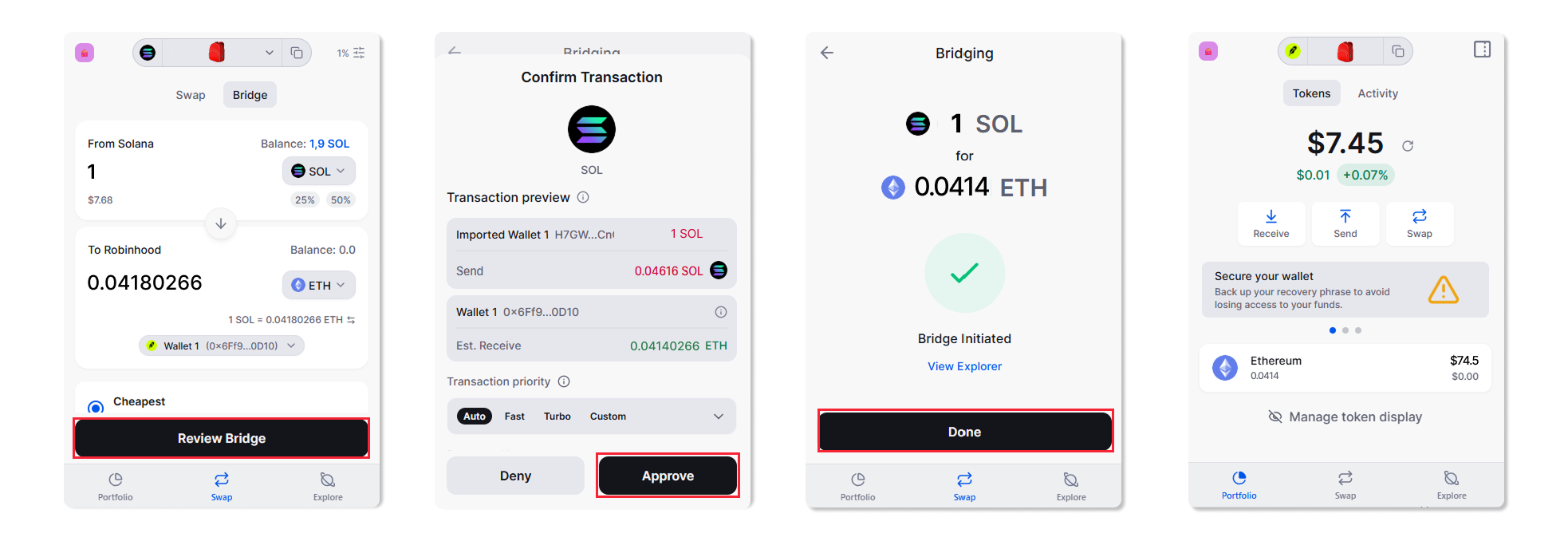
Bridge tokens from Solana, Ethereum, and other supported chains into Robinhood Chain in seconds, directly from Backpack Wallet, and moving them back out works the same way.
- Tap the Swap tab and switch to Bridge
- Select the tokens to send and receive, then enter the amount
- Choose your destination wallet and tap Review Bridge
- Review the transaction and approve
Discover and Swap Tokens
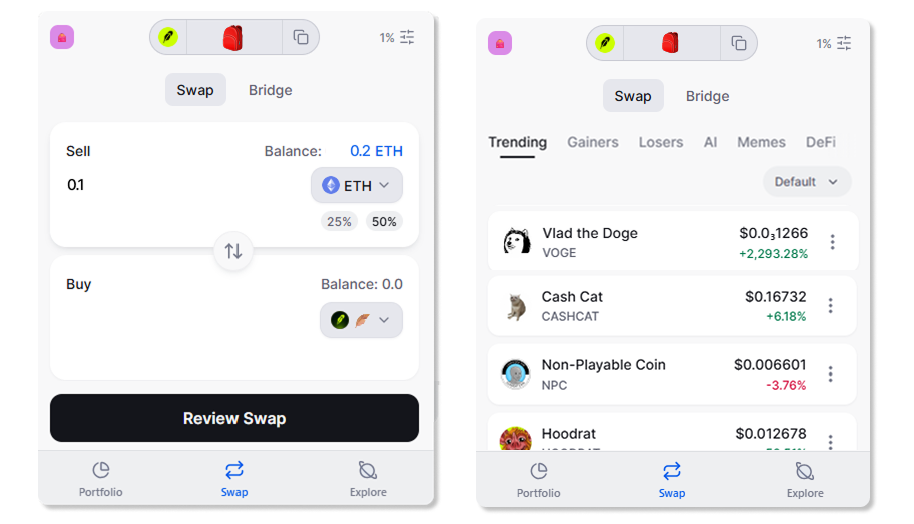
Browse trending Robinhood Chain tokens and swap into them directly from Backpack Wallet.
Explore the Robinhood Chain Ecosystem
Use the in-wallet explorer to discover applications built on Robinhood Chain and start interacting directly within Backpack Wallet.
Your Backpack Wallet is now connected to Robinhood Chain. You can view balances, manage assets, and interact with decentralized applications without leaving the app.
Start exploring Robinhood Chain on Backpack today. Download Backpack Wallet
.png)
Get the latest in crypto dropped to your email.
Terms
Backpack takes seriously its obligations to protect your personal information under the European General Data Protection Regulations and other applicable laws and regulations.
By providing Backpack with your email address, you confirm that you have read and understood the Backpack Privacy Policy and hereby consent to the collection, use, disclosure and processing of your personal information by Backpack and its affiliates.
(https://support.backpack.exchange/articles/privacy-policy)