If you want to convert Aptos (APT) to USD on Backpack Exchange, you can complete the conversion instantly without placing trades. Users receive a quoted USD amount, review it, and confirm the conversion in a few clicks, with no conversion fees charged by Backpack.
Why Convert APT to USD on Backpack Exchange?
For common pairs like APT to USD, convert is often preferred when simplicity and speed matter more than manual price control. Rather than managing orders, users can complete the conversion at a quoted rate and move on.
Key reasons users choose convert for APT to USD include:
- No manual order placement or order book interaction
- Immediate confirmation with a clear quoted amount
- No conversion fees charged by Backpack
- A streamlined flow designed for quick asset changes
Step-by-Step Guide to Convert APT to USD
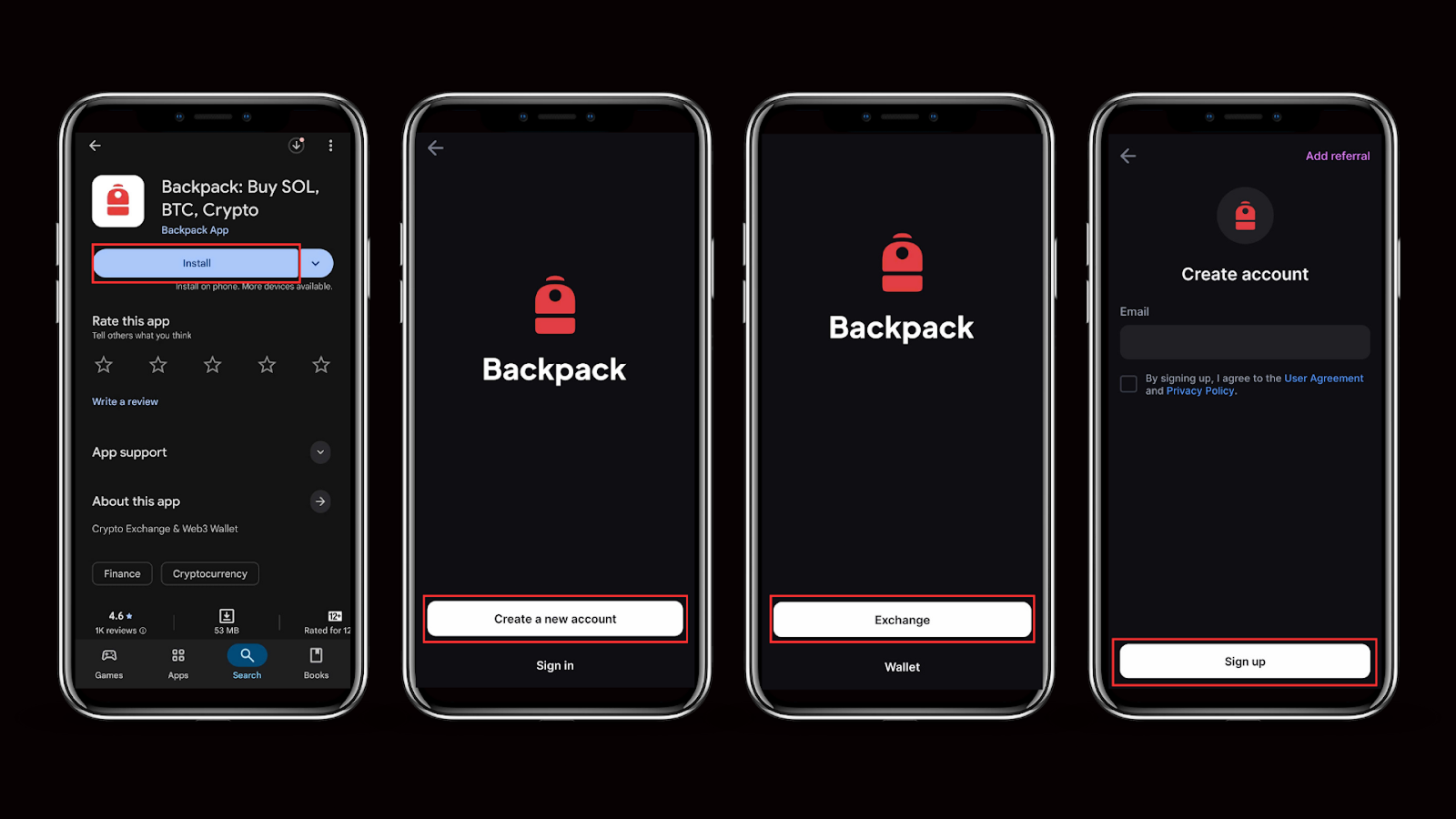
Step 1: Create and Verify Your Account
- Visit Backpack Exchange on desktop or download our mobile app on iOS or Android and click Sign Up.
- Enter your email address or mobile number and create a secure password.
- Verify your account by entering the 6-digit code sent to your email.
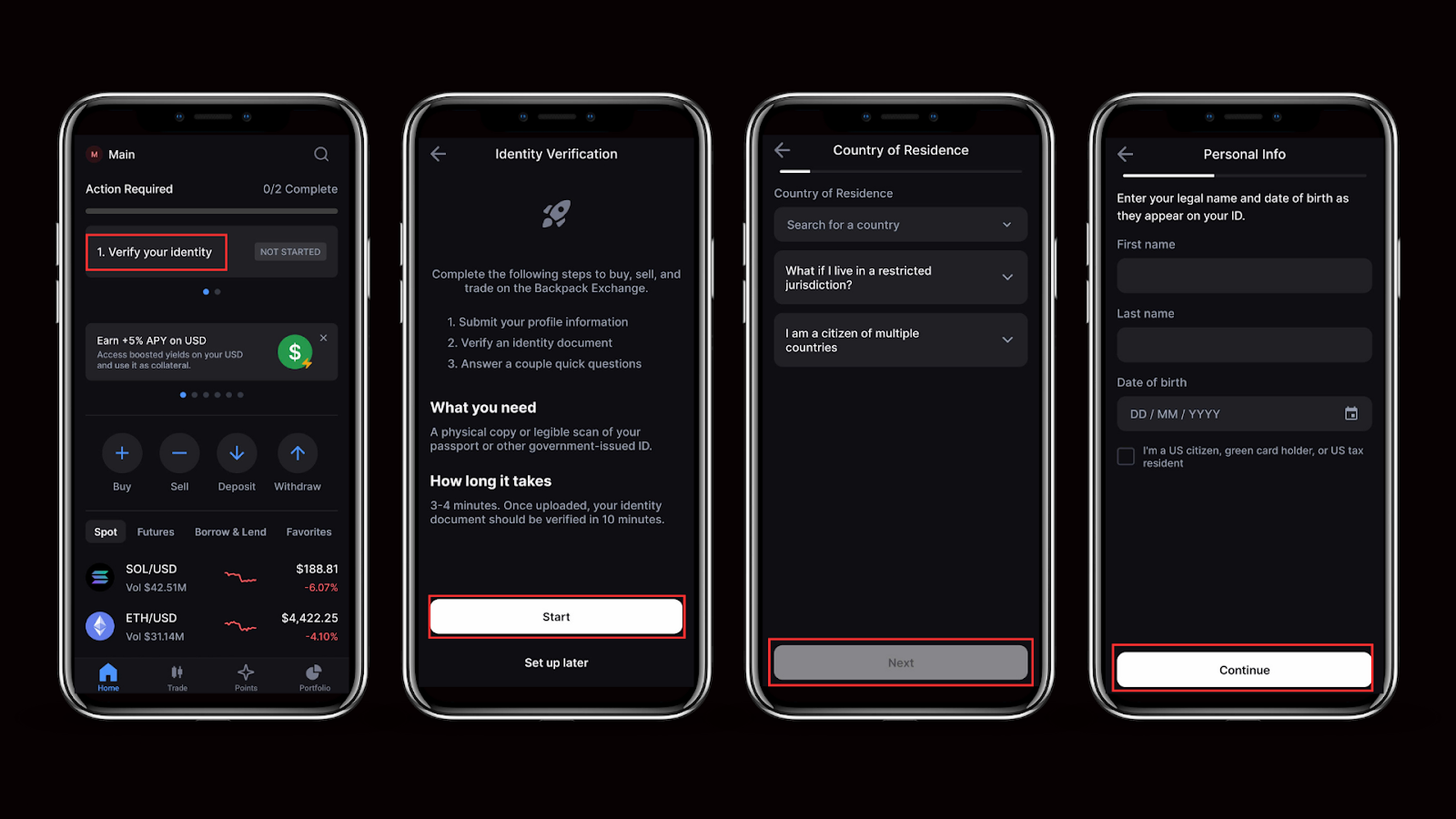
- Complete identity verification (KYC) for full access.
Verification unlocks full features, including deposits and USD withdrawals.
Step 2: Make sure you have APT in your account
You can fund your account in one of these ways:
- Deposit APT (crypto):
Copy the provided Aptos deposit address or scan the QR code, then send SOL from your Aptos wallet to this address. - Buy APT on Backpack Exchange.
Note: Always double-check the address before sending, as blockchain transactions cannot be reversed.
Step 3: Convert APT to USD using Convert
- Open the Convert section on Backpack Exchange.
- Select APT as the asset you want to convert from and choose USD as the asset you want to receive.
- Enter the amount, review the quoted USD amount
- Enter the amount, review the quoted USD amount shown on screen, and confirm to complete the conversion.
.png)
Step 4: Confirm your USD balance
After confirmation, your USD balance will update in your Backpack account. From there, you can hold USD, withdraw it where supported, or use it for other actions on the exchange.
Step 5: Fees and pricing check
Backpack charges no conversion fee for crypto converts. The quoted amount reflects current market conditions at the time you confirm.
What Happens After You Convert APT to USD?
Once your conversion is complete, the USD will appear in your Backpack account balance. On Backpack, USD works the same as USDC, so you can use it seamlessly across trading, withdrawals, and supported on-chain use cases.
- Hold USD on Backpack: Best if you want to keep funds ready for future trading opportunities.
- Cash out USD to your bank account: Ideal when you want real-world access to your funds.
- Withdraw as USDC to your Backpack Wallet: Useful if you want to keep your funds in crypto, use them in DeFi, or transfer instantly on-chain.
- Reinvest: Perfect if you want to use your USD to buy other crypto directly on Backpack Exchange.
- Earn with Backpack: Lend your USD and earn over 5% APY with no limits, stable yield, instant withdrawals, and zero fees.
Important Considerations When Converting APT to USD
Before converting Aptos (APT) to USD on Backpack Exchange, keep the following points in mind:
- Pricing: Convert uses a quoted amount shown before you confirm. The final USD amount depends on market conditions at the time of conversion.
- Fees: Backpack does not charge a conversion fee for crypto converts. Any applicable network or third-party fees are not charged by Backpack.
- Security: Use a strong password and enable account protection methods such as two-factor authentication (2FA) or passkeys. Always make sure you are accessing Backpack Exchange through the official website or mobile app.
- Market risk: Cryptocurrency prices can change quickly. The value of APT may fluctuate between the time you decide to convert and the time you confirm the quote.
- Regulations: Rules for holding or withdrawing USD can vary by jurisdiction. Be aware of local regulations and potential tax obligations.
Conclusion
Converting Aptos (APT) to USD on Backpack Exchange offers a simple way to change assets without placing trades or managing order books. By using the convert feature, users can review a quoted amount, confirm the conversion in a few clicks, and complete the process with no conversion fees charged by Backpack.
This approach is well suited for users who prioritize speed and clarity when moving from APT to USD. Once the conversion is complete, USD can be held, withdrawn, or used across supported Backpack Exchange features depending on your needs.
Learn more about Backpack
Exchange | Wallet | Twitter | Discord | Reddit
Disclaimer: This content is presented to you on an “as is” basis for general information and educational purposes only, without representation or warranty of any kind. It should not be construed as financial, legal or other professional advice, nor is it intended to recommend the purchase of any specific product or service. You should seek your own advice from appropriate professional advisors. Where the article is contributed by a third party contributor, please note that those views expressed belong to the third party contributor, and do not necessarily reflect those of Backpack. Please read our full disclaimer for further details. Digital asset prices can be volatile. The value of your investment may go down or up and you may not get back the amount invested. You are solely responsible for your investment decisions and Backpack is not liable for any losses you may incur. This material should not be construed as financial, legal or other professional advice.