
Buying SOL, the native token of the Solana network, does not require using a traditional exchange interface. If your wallet supports card payments, you can purchase SOL directly inside the app using Apple Pay, a debit card, or a credit card. Once the payment is approved, SOL is deposited straight into your wallet.
This guide explains how to buy SOL directly in a wallet, what you need before purchasing, and how the process works inside Backpack Wallet.
Can You Buy SOL Directly in a Wallet?
Yes. If a wallet supports fiat purchases through an integrated payment provider, you can buy SOL without first using a traditional exchange.
Wallets that integrate card payments allow users to purchase SOL using Apple Pay, debit card, or credit card. Once the transaction is approved, SOL is delivered directly to the wallet address. This removes the need to buy on an exchange and manually withdraw funds.
For example, Backpack Wallet allows users to purchase SOL directly within the wallet interface. After completing payment and verification through the integrated provider, SOL is delivered straight to your wallet address.
What You Need Before Buying SOL
Before purchasing SOL inside a wallet, make sure you have:
- A Solana compatible wallet set up
- A valid payment method such as Apple Pay or debit or credit card
- An email address for verification
In most regions, identity verification is required when purchasing crypto with a card. This process is handled by the integrated payment provider and is part of regulatory compliance.
How to Buy SOL in Backpack Wallet
Backpack Wallet lets you buy SOL directly from within the wallet interface.
Step 1: Open Backpack Wallet
Open Backpack Wallet on your device and unlock your wallet.
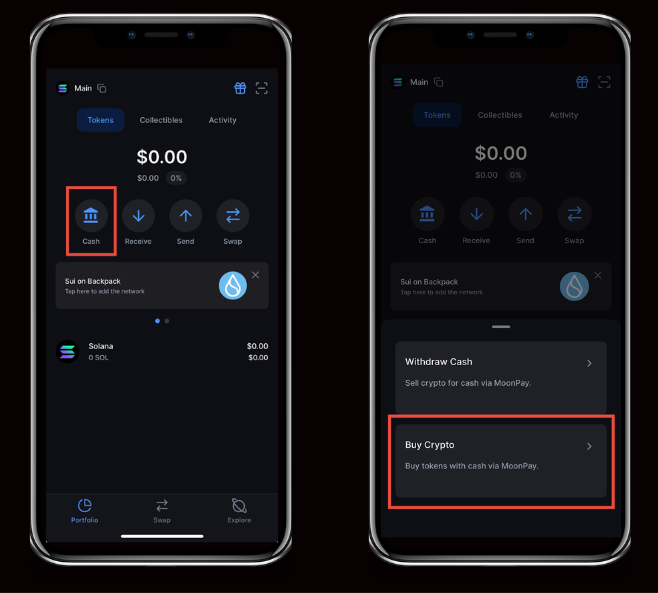
Step 2: Tap “Cash”
On the main wallet screen, tap Cash.
Step 3: Select “Buy Crypto”
Inside the Cash section, select Buy Crypto.
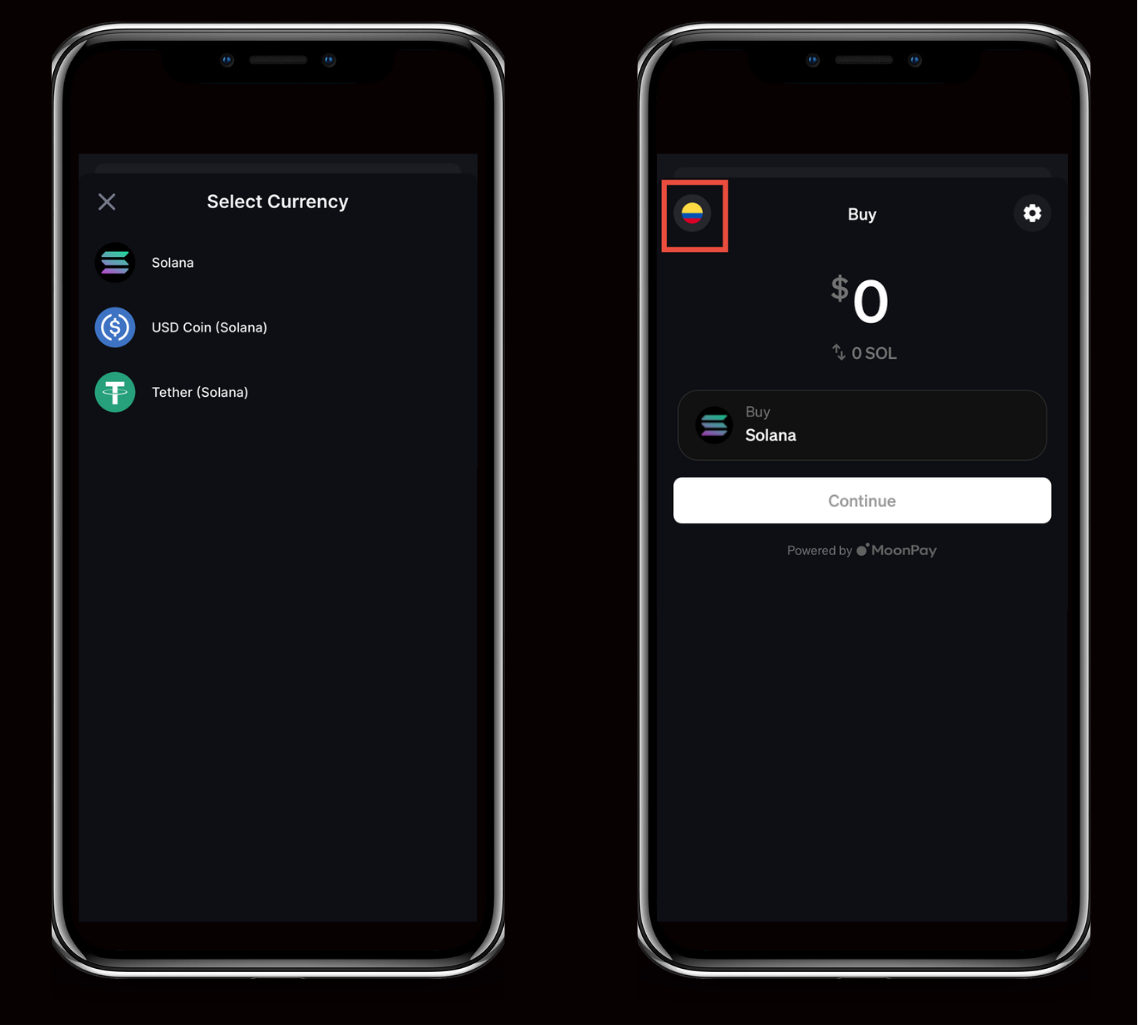
Step 4: Choose SOL
Select SOL from the list of supported assets.
You will be redirected to complete the purchase through the integrated payment provider.
Step 5: Enter the Purchase Amount
Choose your payment currency and enter the amount you want to buy. The displayed rate reflects current market conditions and includes applicable processing fees. A minimum purchase amount may apply depending on your region.
Step 6: Complete Verification
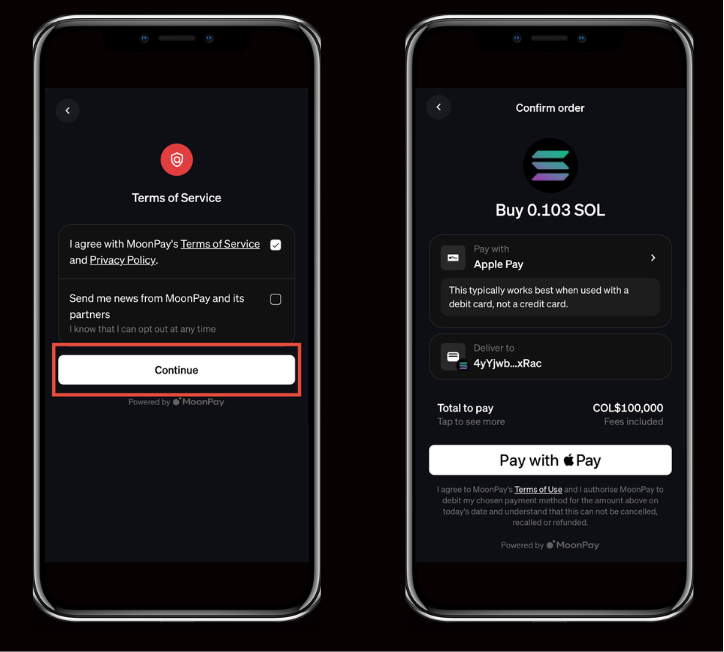
If this is your first purchase, you may be required to verify your email and complete identity verification before the transaction can be processed.
Step 7: Confirm and Pay
Review the order details and complete payment using Apple Pay, debit card, or credit card. Once approved, SOL will be deposited directly into your Backpack Wallet.
How Long Does It Take to Receive SOL?
Card purchases are typically processed within minutes once payment approval and verification are complete. Transaction times may vary depending on your bank and regional processing conditions.
What Are the Fees When Buying SOL in a Wallet?
When purchasing SOL with a debit or credit card, the displayed price includes processing fees from the payment provider. These fees are generally higher than exchange trading fees because they cover card processing, compliance, and conversion costs.
Users who prioritize convenience and speed often prefer wallet purchases. Those making larger purchases may compare exchange fees before deciding. Always review the total cost before confirming a transaction.
Is It Safe to Buy SOL in a Wallet?
Buying SOL inside a reputable wallet that integrates regulated payment infrastructure is generally safe. When using a self-custodial wallet, you control your private keys and maintain direct ownership of your assets at all times.
Backpack Wallet combines self-custody with exchange connectivity in a single platform. Users can manage, transfer, and trade assets without relying on multiple separate apps.
For additional security:
- Keep your recovery phrase private and stored offline
- Enable device security protections such as biometrics or PIN
- Double-check wallet addresses before sending funds
- Never share your private key or recovery phrase with anyone, Backpack will never ask for it
The Bottom Line
Buying SOL directly in a wallet allows you to move from payment to self custody in a single flow. Instead of buying on an exchange and transferring funds separately, you can complete the purchase inside the wallet interface and receive SOL directly in your address.
Backpack Wallet provides a streamlined way to buy, receive, and manage SOL within one ecosystem while maintaining control over your assets.
Ready to get started? Download Backpack at backpack.app and buy your first SOL today.
Learn more about Backpack
Exchange | Wallet | Twitter | Discord | Reddit
Disclaimer: This content is presented to you on an “as is” basis for general information and educational purposes only, without representation or warranty of any kind. It should not be construed as financial, legal or other professional advice, nor is it intended to recommend the purchase of any specific product or service. You should seek your own advice from appropriate professional advisors. Where the article is contributed by a third party contributor, please note that those views expressed belong to the third party contributor, and do not necessarily reflect those of Backpack. Please read our full disclaimer for further details. Digital asset prices can be volatile. The value of your investment may go down or up and you may not get back the amount invested. You are solely responsible for your investment decisions and Backpack is not liable for any losses you may incur. This material should not be construed as financial, legal or other professional advice.