To find unclaimed Solana airdrops, paste your public wallet address into a Solana airdrop checker, confirm any allocation on the project’s official website, and claim before the deadline with the wallet that qualified. Tokens already sitting in your wallet do not need to be claimed again.
If you have used more than one Solana wallet, check the old addresses too. Eligibility stays with the address that did the activity, so a wallet you stopped using can still hold an allocation.
Key Takeaways
- A Solana airdrop checker looks up a public wallet address against the airdrops it covers. It needs your address only, never a recovery phrase or private key.
- Unclaimed airdrops expire. Once a claim window closes, only the project can reopen it.
- Eligibility belongs to the address that did the activity. A new wallet starts with none.
- A checker only knows the projects it supports, so an empty result is a reason to check the project directly.
- Claim only through the project’s official site, and verify a token’s mint address before trusting anything that lands in your wallet unasked.
What is a Solana airdrop checker?
A Solana airdrop checker is a tool that takes a public wallet address and tells you whether that address qualifies for token distributions. Projects decide who qualifies, usually from a snapshot of onchain activity such as swaps, staking or holding a specific token, and the checker matches your address against those eligibility lists.
There are two kinds. A project’s own checker covers a single airdrop and is the final word on that allocation. An aggregator checks one address against many airdrops at once, which makes it the faster starting point when you do not know which projects you might qualify for.
Checking and claiming are separate steps. Checking is read-only and works from the address alone. Claiming moves tokens, so it requires a transaction signed by the wallet that qualified.
Unclaimed airdrops vs. tokens already in your wallet
A “lost” Solana airdrop usually turns out to be one of three things, and each one is checked in a different place.
How to find unclaimed Solana airdrops
1. List every address you have used
Open each Solana wallet you have used for swaps, staking, NFTs or other apps and copy its public address. Include wallets you no longer use, since those are the ones most likely to hold a forgotten allocation. Label each address so you can match results to wallets later.
2. Run the addresses through an airdrop checker
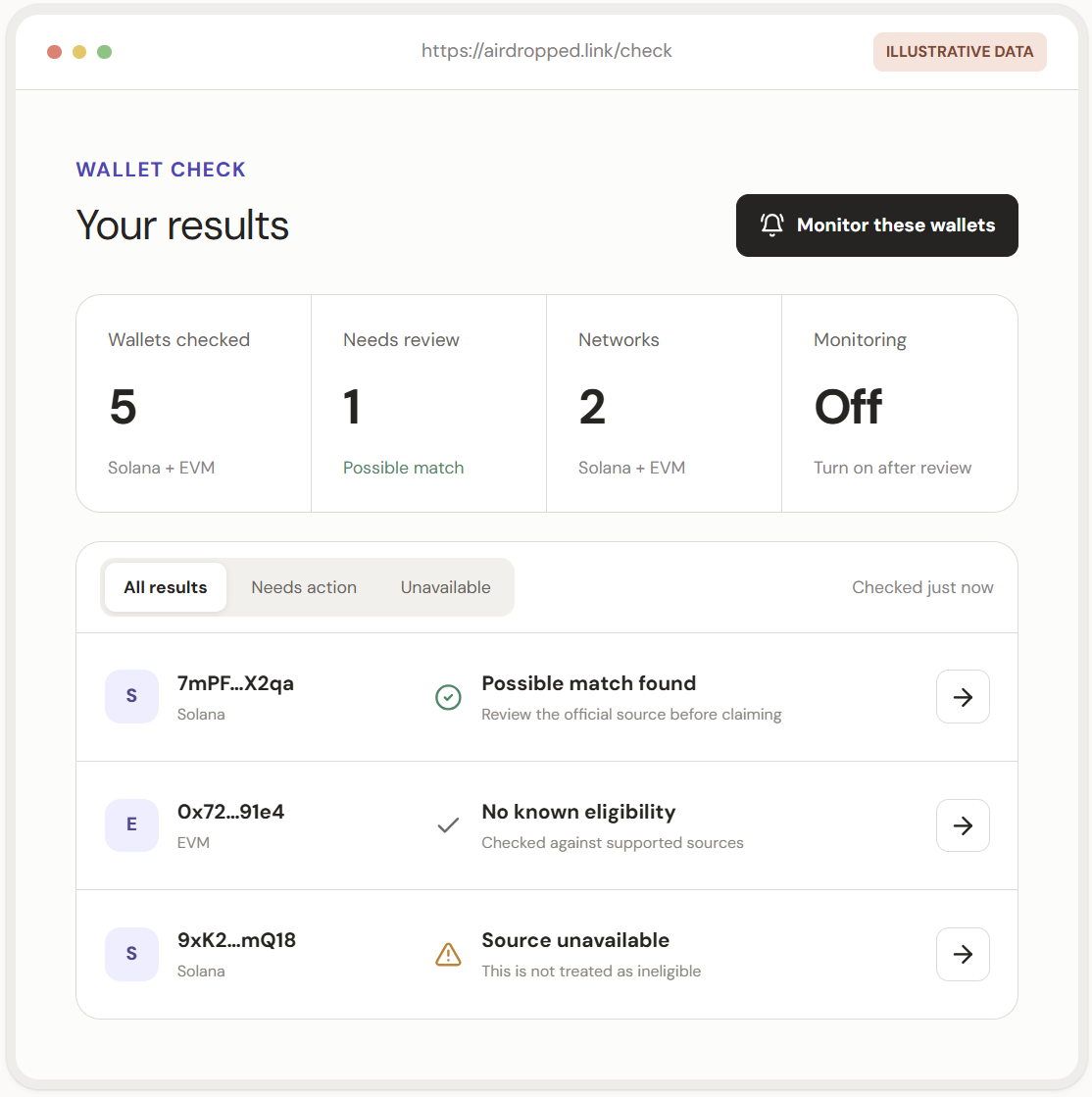
Airdropped.link checks public Solana and EVM addresses against the airdrops it tracks. It has a free tier, accepts several addresses in one check, and can monitor a wallet and notify you about new allocations. Create an account, paste your addresses, and note every project that shows a result.
Each address comes back with one of three results: a possible match to review, no known eligibility, or a source that could not be checked. The last one is an error, so run that address again later.
3. Confirm the allocation on the project’s site
Treat a checker result as a lead. Reach the project’s official website through a source you already trust, such as its verified X profile or documentation, and open its claim or eligibility page. Confirm four things there:
- The allocation is for the address you checked.
- It has not already been claimed.
- The claim window is open, and when it closes.
- Any extra conditions, such as regional restrictions.
Deadlines are real. Jito’s JTO airdrop, for example, gave eligible wallets 18 months from the token launch to claim.
4. Check whether the tokens already arrived
If the project shows the allocation as claimed, or you remember receiving it, look up your address on a Solana explorer such as Solscan and find the token under its balances and transfers. Match the token’s mint address to the one the project publishes, because scam tokens copy names and tickers.
5. Claim with the wallet that qualified
Connect the eligible wallet to the project’s claim page and review the transaction before you approve it. Claiming costs a small network fee in SOL, and sometimes a little more to open an account for the new token, so keep some SOL in the wallet. Once the transaction confirms, check that the token shows in your balance.
What if the checker shows no airdrops?
An empty result means the checker found nothing for that address in the airdrops it tracks. Before you rule an airdrop out, check three things:
- The address. Make sure you checked the wallet that did the activity, then run any other addresses you have used.
- The checker’s coverage. If the project you have in mind is not on the checker’s list, use the project’s own eligibility page.
- The project’s criteria. Compare your activity with the published rules and snapshot date. Activity after the snapshot does not count.
If a token shows on an explorer but not in your wallet, the wallet may be hiding it as unverified. Confirm the mint address, then look in the wallet’s hidden token list.
Using Backpack Wallet for Solana airdrops
Backpack Wallet is a self-custodial wallet for Solana and other networks. In an airdrop check it does three jobs:
- Find your addresses. Each wallet you have added in Backpack has its own Solana address. Switch between them and copy each address to run through the checker.
- Sign the claim. Check that the site address is the project’s official domain, then connect the account that qualified and approve the transaction.
- Show hidden tokens. In Backpack, the hidden token list is under Preferences, in Hidden Tokens. Filter by unverified tokens there and set any token to always show.
How to avoid fake Solana airdrops
Fake airdrops are a common way Solana wallets get drained. They usually arrive as a token or NFT you did not ask for, with a link in its name or description, or as a reply or direct message announcing a reward. Four signs tell you to stop:
- A site asks for your recovery phrase or private key. No real claim needs either. Close the page.
- The link came to you. Links inside unsolicited tokens, NFTs, replies and direct messages lead to copycat sites. Open the project’s site from its verified profile or documentation instead.
- You are asked to send funds first. A real claim costs only a network fee, paid as part of the claim transaction. A request to send SOL or tokens to an address to “unlock” a reward is a scam.
- The transaction asks for more than a claim. If the approval screen shows tokens leaving your wallet, or a request you do not understand, reject it.
Checker sites get copied too, so type the checker’s address yourself or use a saved bookmark.
Learn more about Backpack
Exchange | Wallet | Twitter | Discord | Reddit
Disclaimer: This content is presented to you on an “as is” basis for general information and educational purposes only, without representation or warranty of any kind. It should not be construed as financial, legal or other professional advice, nor is it intended to recommend the purchase of any specific product or service. You should seek your own advice from appropriate professional advisors. Where the article is contributed by a third party contributor, please note that those views expressed belong to the third party contributor, and do not necessarily reflect those of Backpack. Please read our full disclaimer for further details. Digital asset prices can be volatile. The value of your investment may go down or up and you may not get back the amount invested. You are solely responsible for your investment decisions and Backpack is not liable for any losses you may incur. This material should not be construed as financial, legal or other professional advice.