
Using Grid Bots on the Backpack Mobile App
Backpack introduced Grid Bots on the mobile app to help traders manage automated strategies directly on mobile, without relying on APIs, third-party tools, or desktop-only workflows.
Grid Bots allow users to automate buy-low, sell-high strategies while keeping execution native, strategies isolated, and funds fully custodial inside Backpack.
Key Takeaways
- Grid Bots can be created, monitored, and managed directly from the Backpack mobile app
- Each Grid Bot runs inside a dedicated Trading Bot sub-account, isolated from the main account
- Bots execute natively on Backpack with no API keys or third-party integrations
- Deposits and withdrawals are disabled while a bot is running
- Users retain full custody of funds at all times
What Is a Grid Bot on Mobile?
A Grid Bot on Backpack Mobile is a native automated trading strategy that places buy and sell orders across a predefined price range, operating within a Trading Bot sub-account on Backpack Exchange.
Grid Bots allow users to automate trading strategies while keeping funds fully custodial inside their Backpack account and separate from manual trading activity.
How Do Grid Bots Work on the Mobile App?
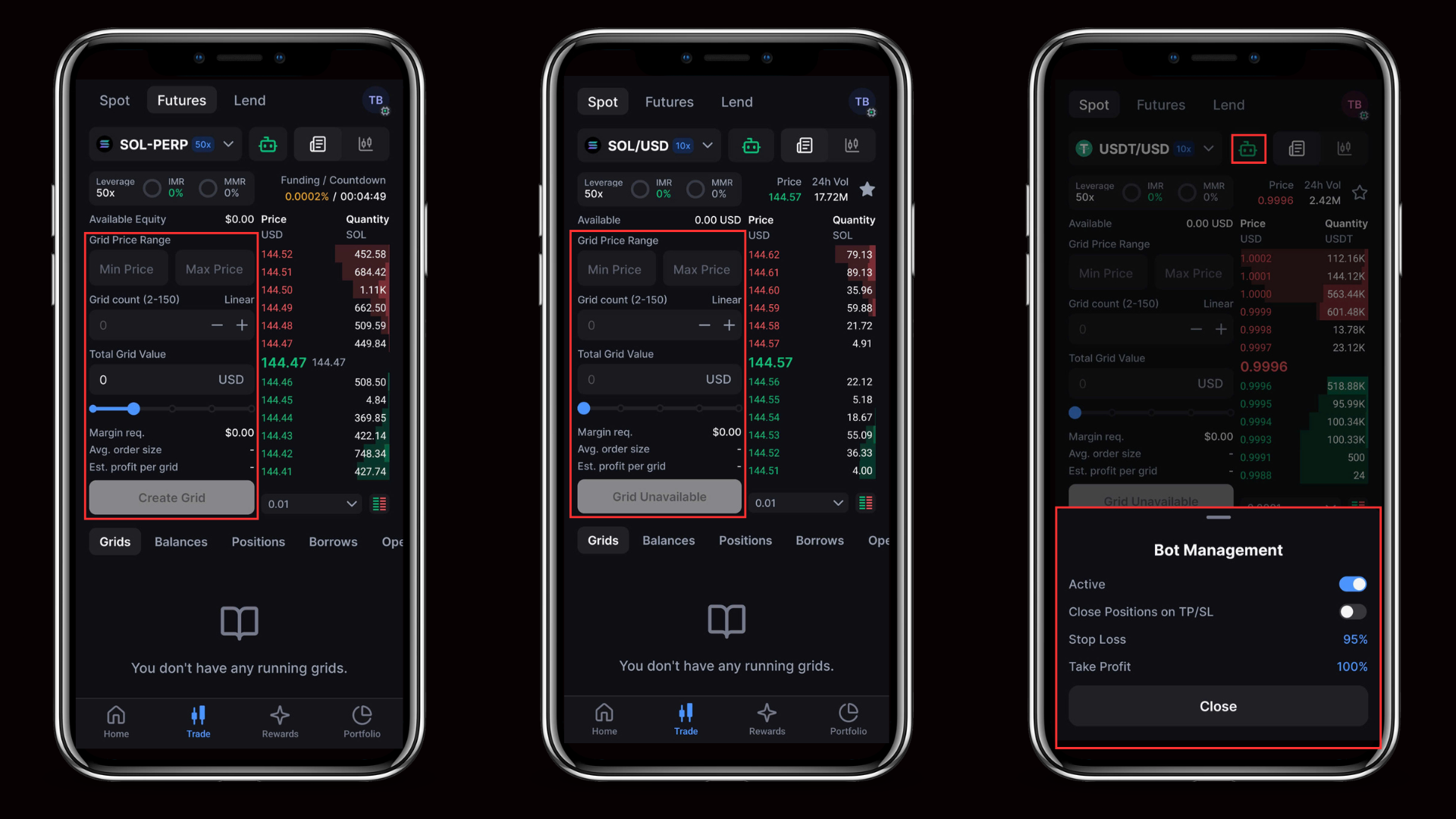
On mobile, Grid Bots are managed through a Trading Bot sub-account that contains all automated strategies.
The flow is:
- A Trading Bot sub-account is created in the mobile app
- Grid strategies are launched inside the sub-account
- Bot-level settings control all strategies within it
- Execution runs on Backpack’s backend, with real-time control and monitoring in the app
This structure prevents conflicts between automated and manual trading activity.
Key Features
Trading Bot Sub-Accounts
Each Grid Bot runs inside a dedicated Trading Bot sub-account. This allows users to isolate automated strategies from their main account, manage risk independently, and track performance and positions clearly.
Bot-Level Controls
Controls shown in the mobile app apply to the entire bot sub-account.
- Bot On and Off starts or stops all strategies
- Stop Loss closes positions when loss thresholds are reached
- Take Profit closes positions when profit targets are met
- Close Positions on TP or SL ensures positions are fully settled
Stopping a single strategy does not turn off the bot.
Native Mobile Execution
- No API keys are required
- No external tools or services are used
- Execution is handled directly by Backpack infrastructure
- Funds remain under full user custody at all times
Why We Built Grid Bots on Mobile
Many automated trading tools require users to generate API keys, rely on third-party platforms, or manage strategies only from desktop environments.
Backpack built Grid Bots on mobile to make automation native, accessible, and secure. Users can manage strategies wherever they are without sacrificing custody, clarity, or control.
Getting Started
1. Open the Backpack mobile app
2. Go to Trade, then Bots
3. Tap Add a Trading Bot
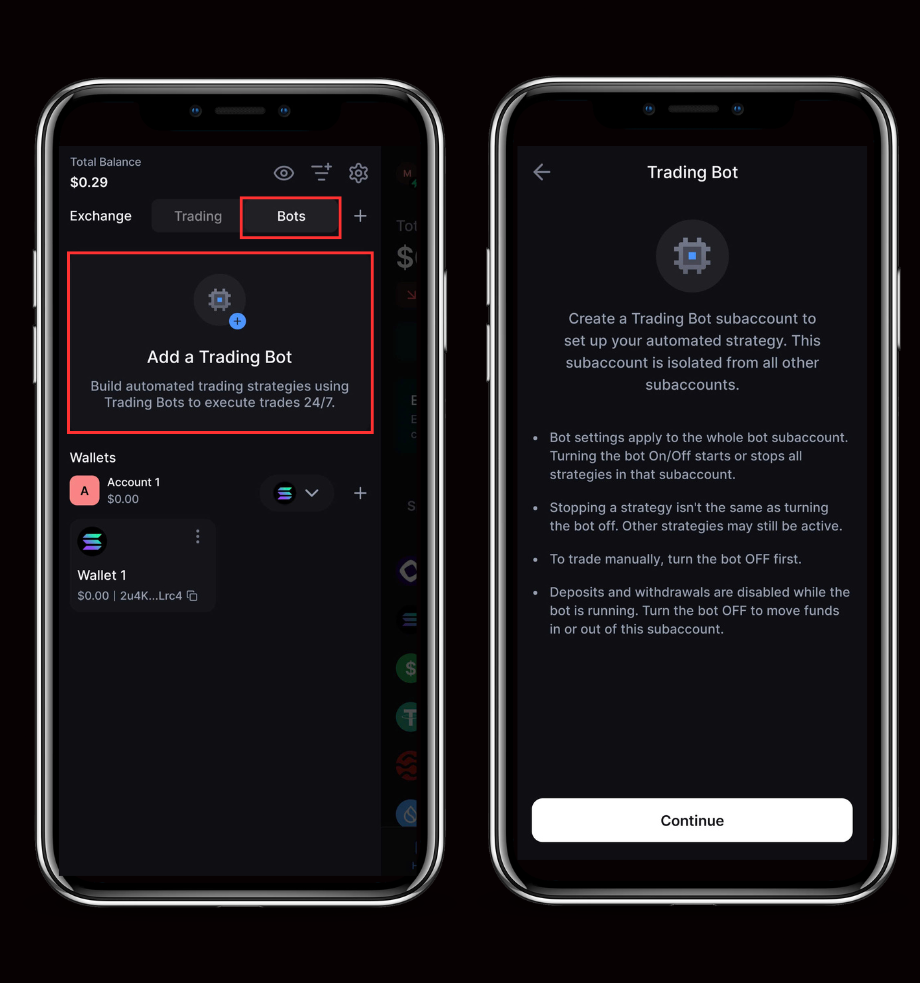
4. Create a Trading Bot sub-account
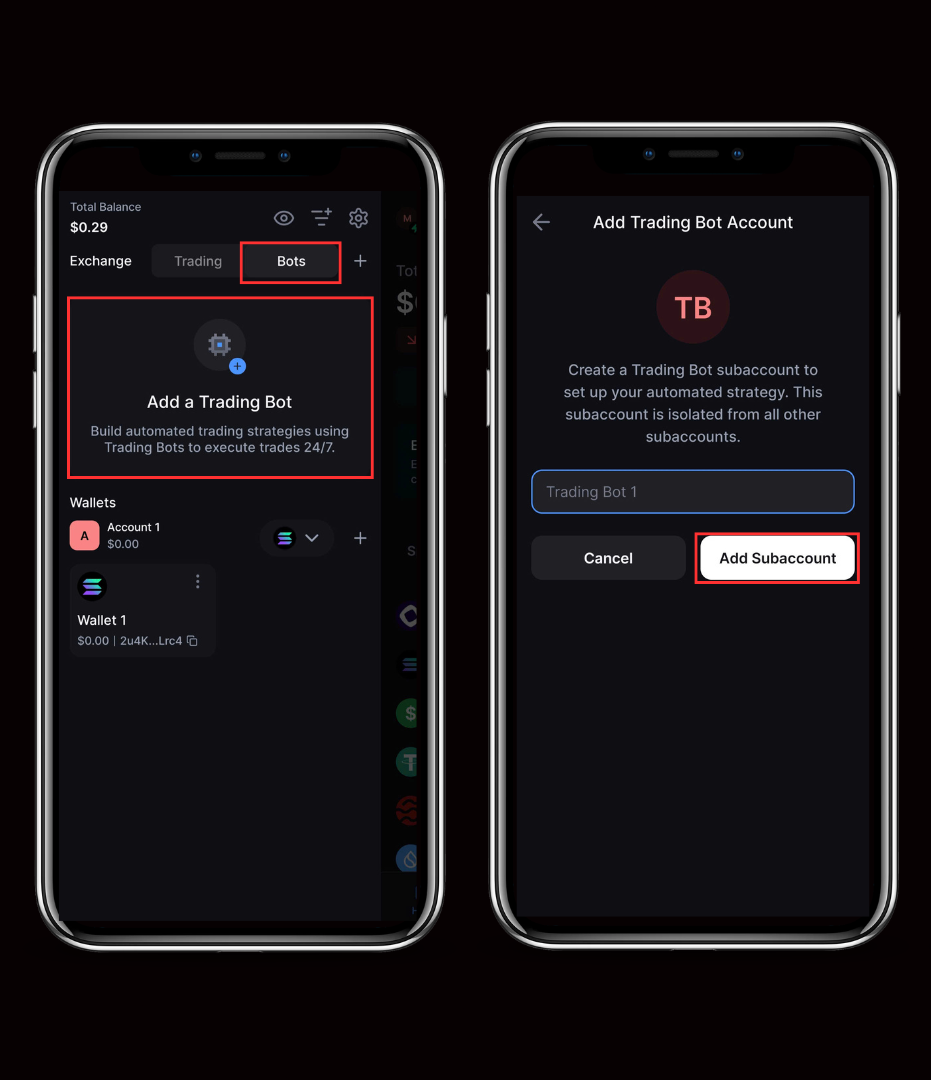
5. Configure and launch a Grid strategy
Learn more about Backpack
Exchange | Wallet | Twitter | Discord
Disclaimer: This content is presented to you on an “as is” basis for general information and educational purposes only, without representation or warranty of any kind. It should not be construed as financial, legal or other professional advice, nor is it intended to recommend the purchase of any specific product or service. You should seek your own advice from appropriate professional advisors. Where the article is contributed by a third party contributor, please note that those views expressed belong to the third party contributor, and do not necessarily reflect those of Backpack. Please read our full disclaimer for further details. Digital asset prices can be volatile. The value of your investment may go down or up and you may not get back the amount invested. You are solely responsible for your investment decisions and Backpack is not liable for any losses you may incur. This material should not be construed as financial, legal or other professional advice.
了解更多关于Backpack的信息
交易所 | 钱包 | Twitter | Discord | Reddit
免责声明:本内容按“原样”提供,仅供一般信息和教育目的,不作任何形式的陈述或保证。不应将其解释为财务、法律或其他专业建议,也不旨在推荐购买任何特定产品或服务。您应向适当的专业顾问寻求自己的建议。如果文章由第三方贡献者提供,请注意,所表达的观点属于该第三方贡献者,不一定反映 Backpack 的观点。请阅读我们的完整免责声明以获取更多详情。数字资产价格可能波动剧烈。您的投资价值可能上涨或下跌,您可能无法收回投资金额。您对自己的投资决策负全部责任,Backpack 对您可能遭受的任何损失概不负责。本材料不应被解释为财务、法律或其他专业建议。