Polygon is one of the most widely used EVM networks in crypto, built for low fees and fast transactions. But if you're new to it, one question comes up almost immediately: do you need a separate wallet just for Polygon, or does your existing Ethereum wallet already work?
Most Ethereum wallets support Polygon. You just need to enable the network.
This guide covers how Polygon wallets work, what POL is used for, how Polygon differs from Ethereum mainnet, and how to get started with a wallet that supports both.
Key Takeaways
- Polygon is an EVM-compatible network. If you already have an Ethereum wallet, you already have a Polygon wallet — you just need to enable the network.
- POL is the native token used to pay gas fees on Polygon. Fees are significantly lower than Ethereum mainnet.
- Most EVM wallets support Polygon natively, including MetaMask, Rabby, and Backpack.
- Multi-chain wallets like Backpack let you manage Polygon alongside Ethereum, Arbitrum, Base, Solana, and other networks from one interface.
- Always store your recovery phrase offline. Anyone who has it can access your funds.
What Is a Polygon Wallet?
A Polygon wallet is a crypto wallet configured to interact with the Polygon network. Because Polygon is EVM-compatible, it uses the same 0x address format as Ethereum. In practice, this means your Ethereum wallet address is also your Polygon address.
The wallet itself does not store cryptocurrency. It stores your private keys, which control access to assets recorded on the Polygon blockchain.
With a Polygon wallet you can send and receive POL, manage ERC-20 tokens and stablecoins like USDC and USDT, hold and transfer NFTs, interact with DeFi protocols on Polygon, and bridge assets between Ethereum and Polygon.
Because Polygon shares the same address format as Ethereum, most users manage both networks within the same wallet rather than maintaining separate ones.
Why Do Users Use Polygon Instead of Ethereum?
The main reason is cost. Ethereum mainnet fees can spike significantly during periods of high activity, making small transactions impractical. Polygon offers a much cheaper alternative while staying compatible with Ethereum-based apps and assets.
Beyond fees, Polygon confirms transactions faster than Ethereum mainnet, which matters for DeFi trading and frequent transfers.
Polygon is commonly used for lower-cost token transfers and stablecoin payments, everyday DeFi activity where Ethereum gas fees would eat into returns, applications that require high transaction volume, and NFT minting and trading where per-transaction costs add up quickly.
For users who need Ethereum compatibility without paying Ethereum mainnet prices, Polygon fills that gap. Assets can be bridged from Ethereum to Polygon and used across most of the same protocols.
How Does a Polygon Wallet Work?
A Polygon wallet works the same way as an Ethereum wallet, but it interacts with the Polygon network instead of Ethereum mainnet.
When you send POL or interact with a dApp, your wallet creates a transaction, signs it with your private key, and broadcasts it to the Polygon network. Validators verify the signature and record the transaction on-chain. The whole process typically takes a few seconds.
Every transaction requires a small gas fee paid in POL. Because Polygon uses a different validator structure from Ethereum mainnet, these fees are significantly lower.
One thing worth understanding: because Polygon is EVM-compatible, your Ethereum address works on Polygon automatically. You do not need to create a new wallet. You just need to make sure your wallet has Polygon enabled and that you have POL to cover gas fees.
Polygon Wallet vs Ethereum Wallet
This is a question that confuses a lot of newcomers. Technically, they are the same wallet. The difference is the network you select.
Because Polygon is EVM-compatible, your 0x address works on both networks. When you switch to Polygon inside your wallet, you are accessing the same address but interacting with a different blockchain.
The practical differences come down to three things:
Fees. Ethereum mainnet fees fluctuate and can become expensive during peak periods. Polygon fees are consistently low, typically a fraction of a cent per transaction.
Speed. Polygon confirms transactions faster than Ethereum mainnet, which matters for frequent DeFi activity.
Bridging. Assets on Ethereum mainnet do not automatically appear on Polygon. You need to bridge them first using a trusted bridge before they are usable on Polygon.
The most common mistake users make is sending assets on the wrong network. Always confirm which network your wallet is set to before approving a transaction.
How to Choose the Right Polygon Wallet
How to Choose the Right Polygon Wallet
Most EVM wallets support Polygon, so the choice comes down to how you plan to use the network.
Self-custody. Look for a non-custodial wallet where you control your private keys. With custodial wallets, a third party holds your keys and ultimately controls your funds.
Native Polygon support. Some wallets require manual RPC configuration to add Polygon. Others, like Backpack, support it by default. Native support reduces setup friction and the risk of configuration errors.
Multi-chain capability. If you use Ethereum, Arbitrum, Base, or other networks alongside Polygon, a multi-chain wallet lets you manage everything under one recovery phrase without switching between apps.
Clear transaction prompts. A good wallet shows you exactly what you are approving before you sign. This matters more on Polygon than on Ethereum mainnet because lower fees make it easier to interact with a high volume of dApps and contracts.
Hardware wallet support. If you hold significant value on Polygon, look for a wallet that integrates with Ledger or similar devices for offline signing.
There is no single best Polygon wallet. Active DeFi users tend to prefer browser extension wallets for seamless dApp interaction. Long-term holders typically prioritize hardware wallet integration. Users operating across multiple chains benefit most from a unified multi-chain interface.
How Backpack Supports Polygon Users
Backpack supports Polygon natively alongside Ethereum, Arbitrum, Base, Optimism, BNB Chain, Solana, Sui, Sei, and Monad. You can manage assets across all these networks under a single recovery phrase, without switching between wallet apps.
For Polygon users, Backpack offers:
- POL and ERC-20 token support on Polygon
- NFT compatibility with ERC-721 and ERC-1155 standards
- Integrated token swaps and cross-chain bridging with 0% protocol fees
- Clear transaction previews before signing
- Hardware wallet integration with Ledger and Keystone
- Available on iOS, Android, and browser extension
For users who regularly move between Polygon and other networks, having everything in one interface reduces friction and lowers the risk of sending assets to the wrong network.
How to Create a Polygon Wallet with Backpack
Setting up a Polygon wallet typically takes only a few minutes.
On Desktop
- Download the Backpack browser extension from the official Backpack website.

- Open the extension and select Create a new wallet.
- Enable the Polygon network from the supported networks list.
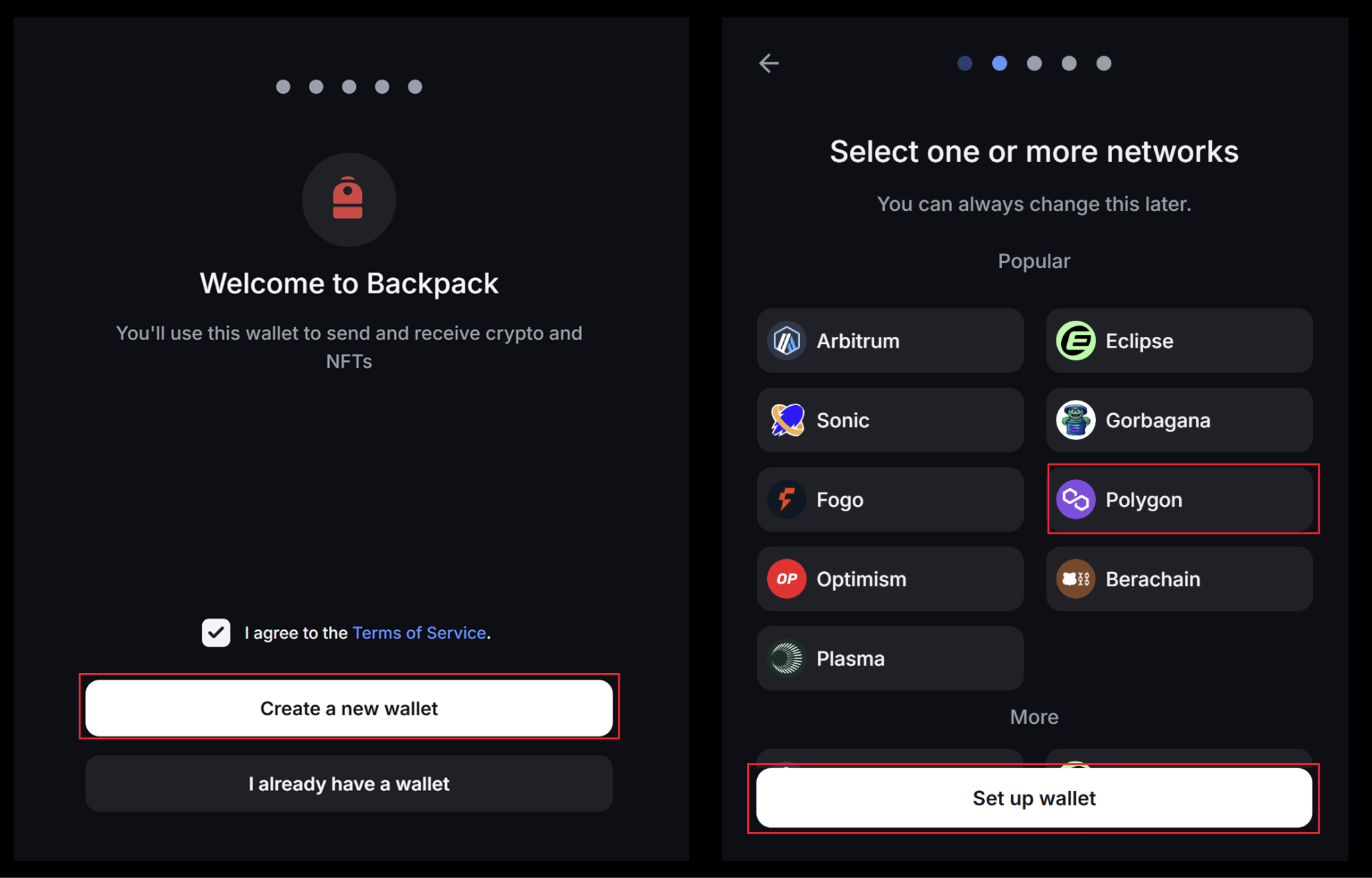
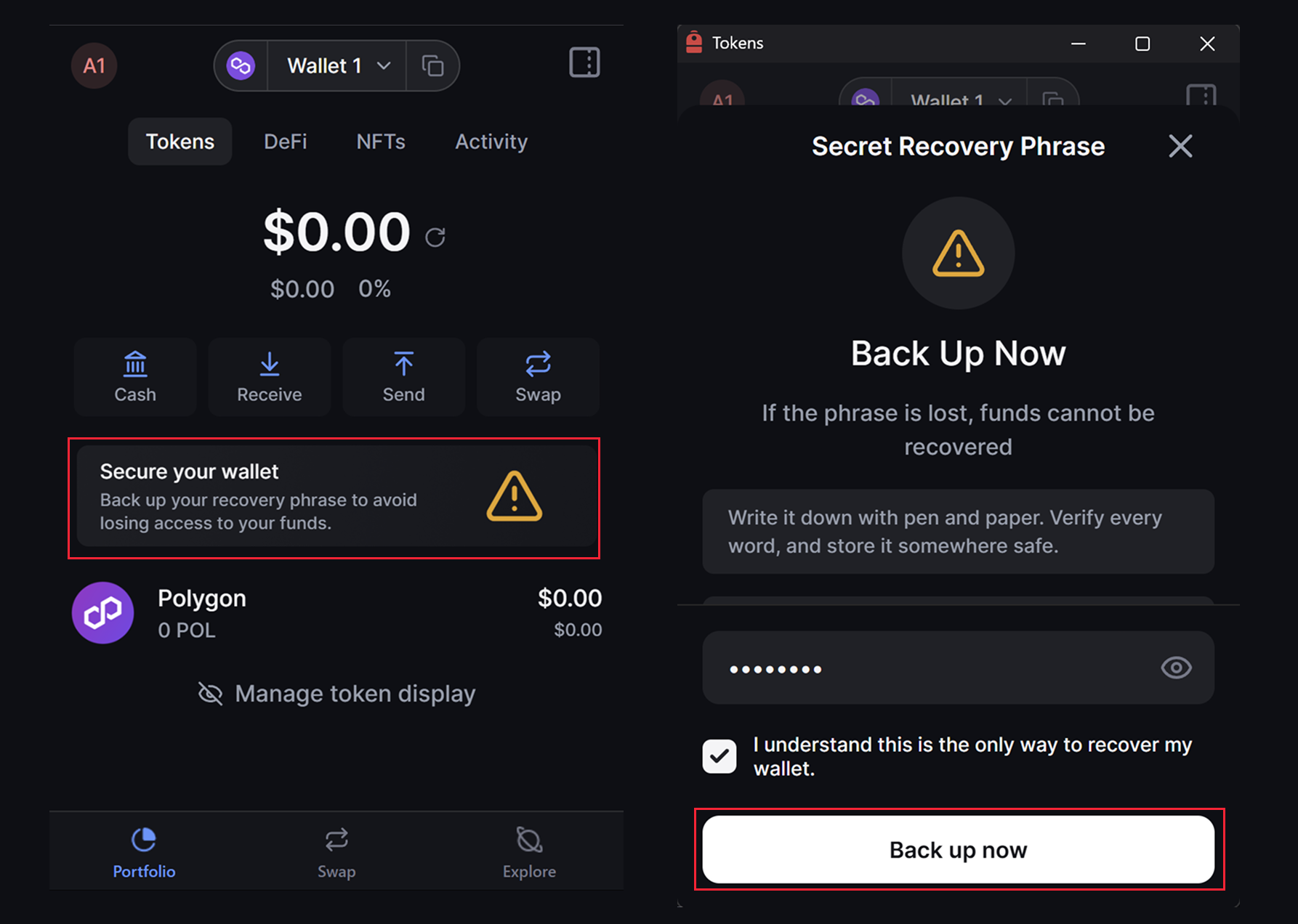
- Create a strong password.
- Write down your 12-word recovery phrase and store it securely offline.
- Confirm the recovery phrase when prompted.
On Mobile
- Download Backpack from the official App Store or Google Play listing.

- Create a new wallet.
- Enable the Polygon network.
- Securely store your recovery phrase offline.
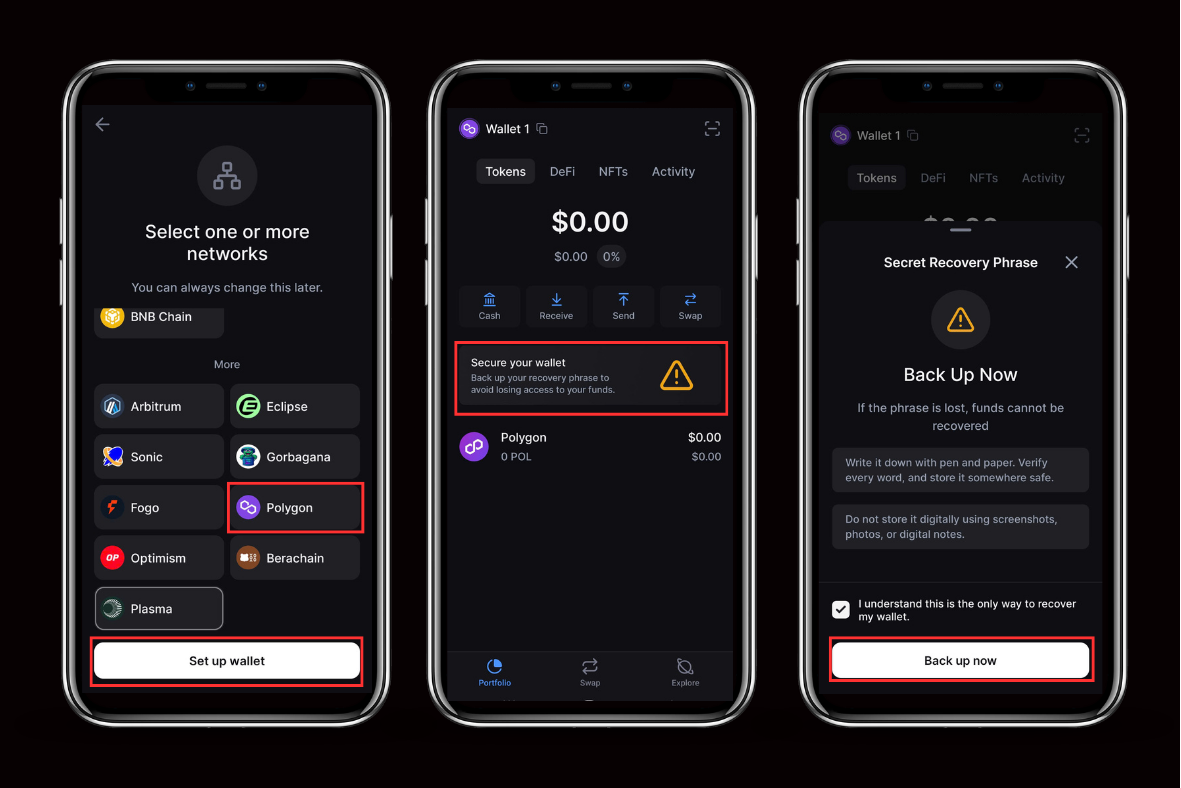
Once set up, you can transfer POL or bridge assets from Ethereum to Polygon.
Is a Polygon Wallet Safe?
A Polygon wallet is as secure as the practices of the person using it. The network itself is secured by validators, but most risks come from user mistakes, phishing attempts, and unsafe smart contract interactions.
Protect your recovery phrase above everything else. Your recovery phrase controls your wallet across every network tied to it, including Polygon, Ethereum, and any other chain you have enabled. Store it on paper, keep it offline, and never share it with anyone.
Confirm the network before sending. Because Polygon and Ethereum share the same 0x address format, it is easy to send assets on the wrong network. Always check which network your wallet is set to before approving a transaction.
Keep POL available for gas. Without POL in your wallet, you cannot send tokens or revoke approvals, even if you hold other assets. Keep a small amount of POL available at all times.
Use trusted bridges only. Bridging from Ethereum to Polygon involves interacting with smart contracts. Only use official or well-established bridges and verify the URL carefully before connecting your wallet.
Review token approvals regularly. DeFi applications on Polygon require permission to access your tokens. Periodically review and revoke approvals you no longer need, especially for protocols you no longer use.
Transactions on Polygon are irreversible once confirmed. Always review transaction details before signing.
Common Mistakes to Avoid
Even experienced users make costly mistakes when managing a Polygon wallet. These are the most common ones:
- Sending assets on the wrong network. Polygon and Ethereum share the same address format, so the recipient address will look valid even if you select the wrong network.
- Storing your recovery phrase digitally, in screenshots, cloud storage, or notes apps.
- Running out of POL for gas. If your POL balance hits zero, you cannot move any tokens or revoke approvals until you top up.
- Using unverified bridges or dApps. Always verify the URL before connecting your wallet.
- Signing transactions without reading the details. On Polygon, low fees make it tempting to approve quickly. Take the extra second to review what you are signing.
- Ignoring token approvals granted to dApps you no longer use.
Final Thoughts
Polygon remains one of the most practical EVM networks for everyday crypto use. Low fees and fast confirmations make it a reasonable choice for DeFi, stablecoin transfers, and NFT activity where Ethereum mainnet costs would be prohibitive.
If you already use an Ethereum wallet, getting started on Polygon requires minimal setup. Enable the network, add some POL for gas, and you are ready to go.
As with any crypto wallet, the security of your funds comes down to how you manage your keys. Store your recovery phrase offline, verify transactions before signing, and stay cautious with bridges and unfamiliar dApps.
Learn more about Backpack
Exchange | Wallet | Twitter | Discord | Reddit
Disclaimer: This content is presented to you on an “as is” basis for general information and educational purposes only, without representation or warranty of any kind. It should not be construed as financial, legal or other professional advice, nor is it intended to recommend the purchase of any specific product or service. You should seek your own advice from appropriate professional advisors. Where the article is contributed by a third party contributor, please note that those views expressed belong to the third party contributor, and do not necessarily reflect those of Backpack. Please read our full disclaimer for further details. Digital asset prices can be volatile. The value of your investment may go down or up and you may not get back the amount invested. You are solely responsible for your investment decisions and Backpack is not liable for any losses you may incur. This material should not be construed as financial, legal or other professional advice.