What You Need to Use Arc Network
Arc is the Layer 1 blockchain built by Circle that went live on September 16, 2026. To hold, send, swap, or bridge assets on it, you need a wallet that supports the network. Arc is EVM compatible, so your existing Ethereum address can serve as your Arc address.
What separates a wallet that supports Arc from one that does not is native network recognition. A supported wallet shows your Arc balances, routes transactions over Arc, and lets you bridge in without manually adding an RPC endpoint, which is where new users most often make mistakes or land on a phishing page.
Which Wallets Support Arc Network?
Backpack Wallet supported Arc from day one, with a dedicated portfolio and ecosystem view for the network:
- Send, receive, and hold Arc assets in full self custody
- Swap tokens on Arc without leaving the app
- Bridge between Arc and other supported networks in seconds
- Explore Arc applications from the in wallet explorer
- Manage Arc balances alongside a full multichain portfolio
Why a Wallet on Arc Works Differently
On every other major chain, a wallet needs two assets to function. One is the money you actually want to move. The other is a gas token you hold only to pay fees: ETH on Ethereum, SOL on Solana, and so on. That second balance runs down, needs topping up, and swings in price for reasons unrelated to what you are doing.
Arc uses USDC as its native gas token. One asset covers both roles.
For anyone whose onchain activity is mostly stablecoins, this removes the single most common reason a transaction fails.
How to Set Up Arc Network in Backpack Wallet
Step 1. Update and open your wallet. Download Backpack Wallet on mobile or as a browser extension, or update to the latest version. Create a new wallet or import one with your recovery phrase, then store that phrase offline.
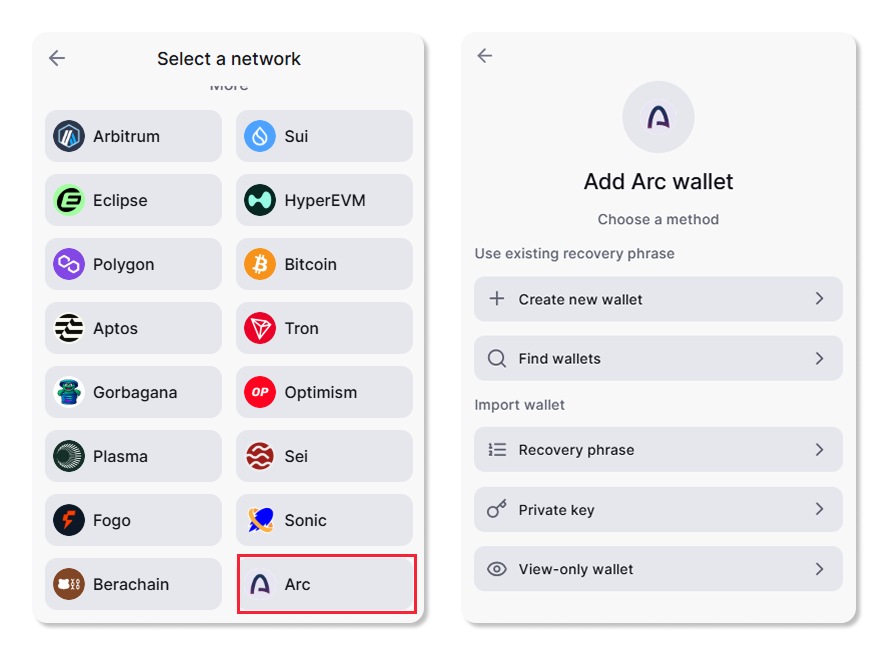
Step 2. Fund your Arc balance with USDC. Arc uses USDC for gas, so keep some available to cover transaction fees. Without it, nothing else on this list will execute.
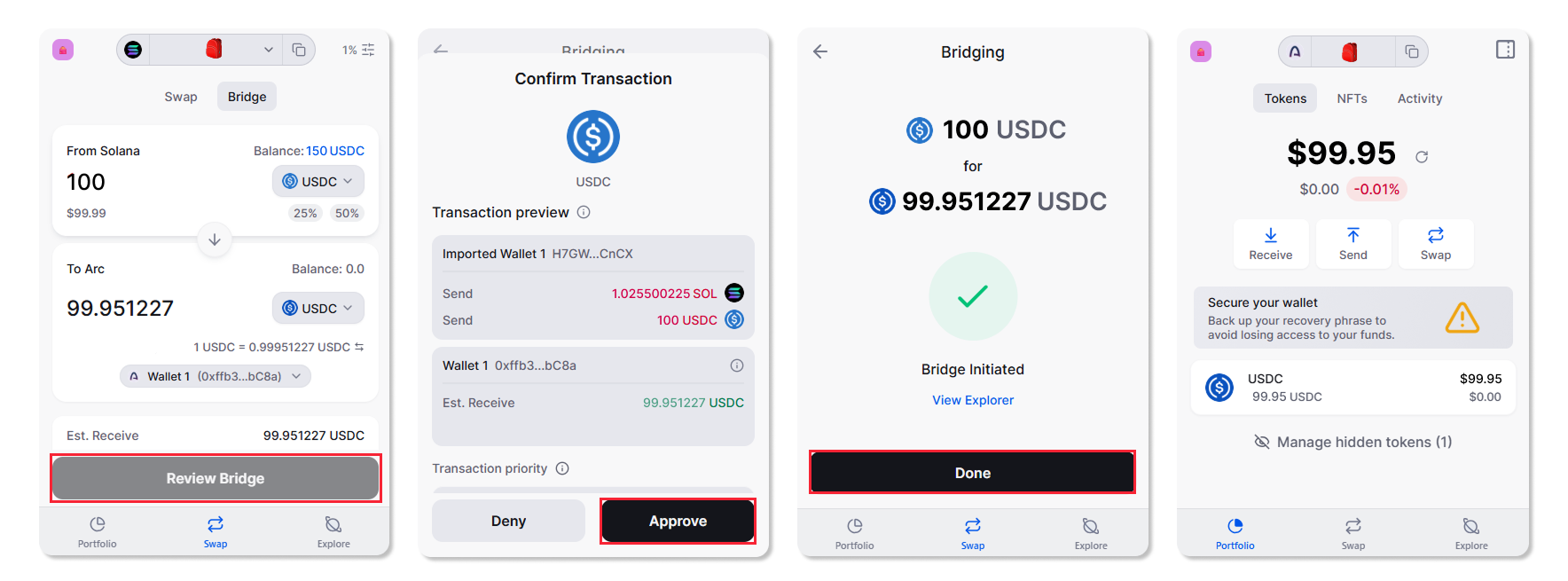
Step 3. Bridge assets in. Tap the Swap tab and switch to Bridge. Select the tokens to send and receive, enter the amount, choose your destination wallet, then review and approve. Assets from Solana, Ethereum, and other supported chains arrive on Arc in seconds, and bridging back out works the same way.
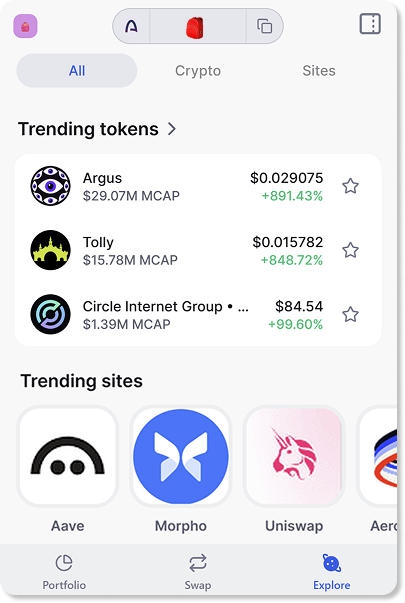
Step 4. Swap and explore. Browse Arc tokens and swap directly in the wallet, or open the in wallet explorer to connect to applications built on Arc.
What to Watch Out For
Arc launched with more than 100 applications, but the early ecosystem leans institutional rather than retail. A few things are worth knowing before you go looking.
No ARC token is trading. Circle minted the full 10 billion supply at genesis and has sold part of it to institutional investors, but describes the mint as a technical milestone rather than a decision to launch publicly. There is no public distribution and no market. Any asset listed under an ARC ticker today belongs to a different project.
No airdrop has been announced. Circle has not confirmed one. Treat claim sites, forms, and direct messages offering an Arc airdrop as phishing.
Verify before you sign. No legitimate application, support agent, or airdrop will ask for your recovery phrase. Check contract addresses against more than one source before swapping into a new token.
Bridge through your wallet. Searching for a bridge site is how most users end up on a fake one. Using the bridge built into a wallet that supports Arc natively removes that step.
Learn more about Backpack
Exchange | Wallet | Twitter | Discord | Reddit
Disclaimer: This content is presented to you on an “as is” basis for general information and educational purposes only, without representation or warranty of any kind. It should not be construed as financial, legal or other professional advice, nor is it intended to recommend the purchase of any specific product or service. You should seek your own advice from appropriate professional advisors. Where the article is contributed by a third party contributor, please note that those views expressed belong to the third party contributor, and do not necessarily reflect those of Backpack. Please read our full disclaimer for further details. Digital asset prices can be volatile. The value of your investment may go down or up and you may not get back the amount invested. You are solely responsible for your investment decisions and Backpack is not liable for any losses you may incur. This material should not be construed as financial, legal or other professional advice.