%20(1).png)
Token launchpads make it easier for users to create and trade new crypto assets without building the underlying infrastructure themselves. On Monad, nad.fun provides this type of experience through token launches, trading tools, and community-based features.
This article explains how nad.fun works, how tokens move from a bonding curve to decentralized exchange trading, and what users should consider before launching or trading a token.
What Is nad.fun?
nad.fun is a decentralized token launchpad and trading platform built on Monad. Users can create tokens without deploying a separate smart contract or manually setting up an initial liquidity pool.
New tokens begin trading through a bonding curve. Once the curve reaches its target reserves, the token graduates to a Uniswap V3 liquidity pool and continues trading on a decentralized exchange.
The platform also provides token pages and trading tools for viewing price, volume, transactions, creator details, and contract information.
How Does nad.fun Work?
A token launched on nad.fun generally moves through two stages.
1. Bonding Curve Trading
When a token is first created, users buy and sell it through a bonding curve rather than a conventional decentralized exchange pool.
A bonding curve determines the token price based on the amount purchased and the reserves accumulated by the contract. As demand and reserves increase, the price offered by the curve also increases.
This structure allows trading to begin without requiring the creator to manually supply an initial liquidity pair. However, the price can move quickly, particularly when a token has limited trading activity or concentrated ownership.
2. Graduation to Uniswap V3
Once the bonding curve reaches its target reserves, the token graduates to Uniswap V3. Trading then moves from the bonding curve to a decentralized exchange liquidity pool.
Graduation does not guarantee that a token will maintain its price, liquidity, or trading activity. It only means that the token has completed nad.fun’s bonding curve phase and moved to DEX-based trading.
Key Features of nad.fun
Token Launches
nad.fun allows users to create a token by providing basic details such as its name, ticker, image, description, and social links. New launches use MON as the quote asset and begin trading through the platform’s bonding curve.
Customizable Trading Fees
Tokens launched through nad.fun apply a 1% trading fee. Creators can allocate that fee among supported strategies, including creator rewards, token buybacks and burns, liquidity support, and holder dividends.
Trading Terminal
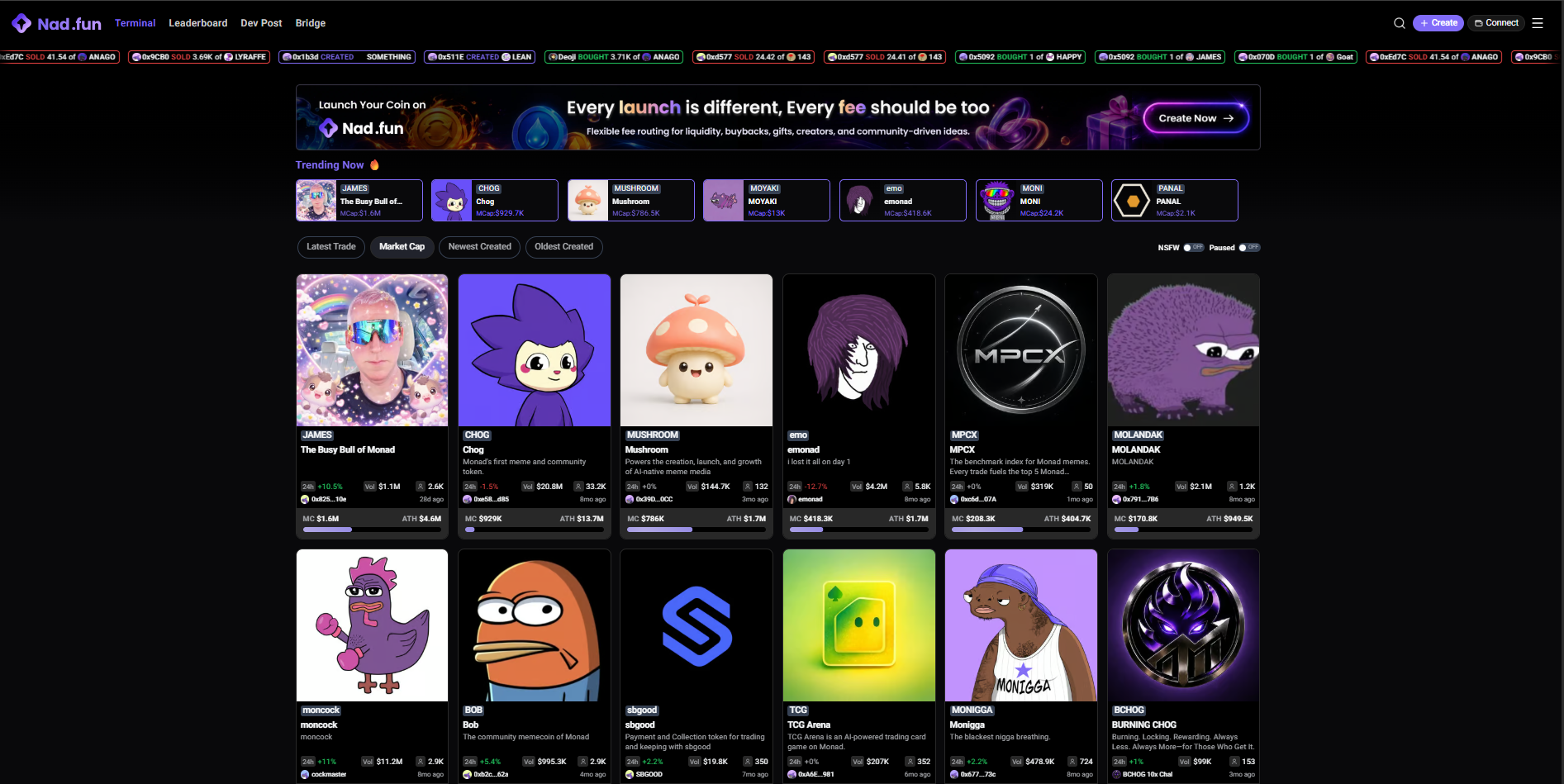
The nad.fun terminal allows users to discover and trade tokens while reviewing information such as price, market capitalization, trading volume, recent transactions, and contract details.
Hypeboard and Prediction Features
nad.fun also includes community-based features such as Hypeboard and prediction markets. These campaigns may operate under changing seasons or rules, so users should check the live platform for current availability and eligibility.
How to Launch a Token on nad.fun
Creating a token on nad.fun involves the following steps.
1. Set Up a Monad-Compatible Wallet
Use a wallet that supports Monad Mainnet, such as Backpack Wallet. Make sure your wallet is connected to the correct network.
2. Add MON to the Wallet
Add enough MON to cover the token deployment cost, any optional initial purchase, and network fees. You can transfer MON from a supported platform or use an available bridge.
3. Open the Official Token Creation Page
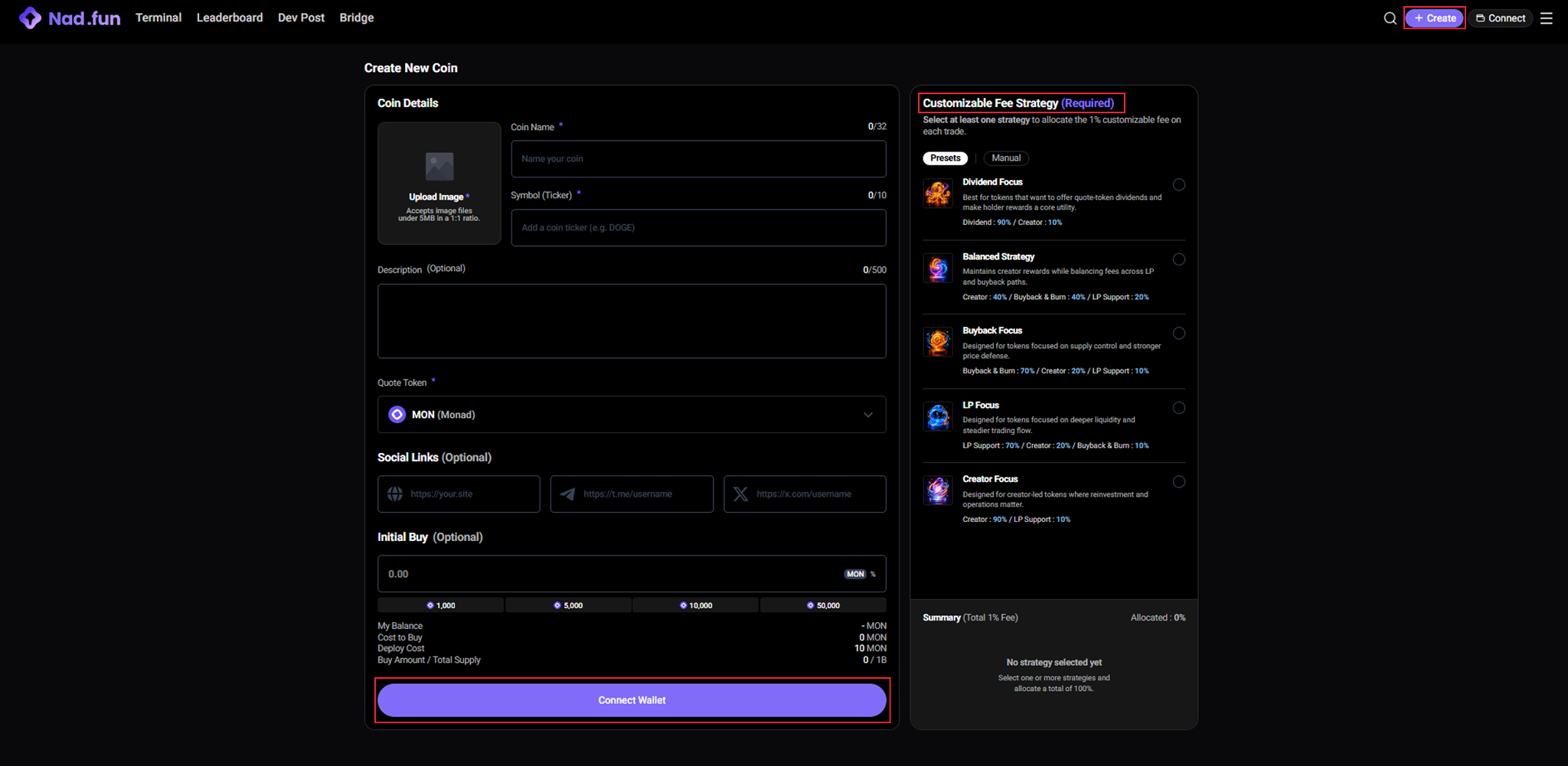
Visit the official nad.fun website and select Create.
Before connecting a wallet or approving a transaction, verify that the domain is correct. Fake launchpad pages may imitate the appearance of legitimate platforms to request malicious wallet permissions.
4. Enter the Token Details
Provide the required information, including:
- Image
- Coin name
- Ticker symbol
A description and social links are optional. Creators should avoid using names, branding, or intellectual property they do not have permission to use.
5. Choose a Fee Strategy
Select how the 1% trading fee will be allocated among creator rewards, buybacks and burns, liquidity support, or holder dividends.
The selected structure can influence how trading fees are used after launch, so creators should review each allocation carefully rather than selecting a preset without understanding it.
6. Review and Confirm the Launch
Check the deployment cost, initial buy amount, fee allocation, and wallet balance before confirming.
Once the transaction is approved and executed, the token becomes available through nad.fun’s launch and trading system.
Creating a token does not guarantee that it will attract buyers, graduate from the bonding curve, or retain liquidity.
How Much Does It Cost to Launch a Token on nad.fun?
Launching a token on nad.fun may involve three types of costs:
- Deployment cost: The current deployment fee is displayed on the token creation page before you confirm the launch.
- Optional initial purchase: Creators can choose to buy their own token during the launch process, which increases the amount of MON required.
- Monad network fees: Like other onchain transactions, launching a token requires MON to pay network gas fees.
In addition, tokens launched through nad.fun currently apply a 1% trading fee to each trade. The fee allocation is selected during the token creation process and may be directed toward creator rewards, buybacks and burns, liquidity support, or holder dividends. Because platform settings may change over time, always review the live creation page before confirming a launch.
How to Trade Tokens on nad.fun
1. Connect Your Wallet
Open the official nad.fun platform and connect a wallet that supports Monad Mainnet. Make sure you have enough MON for the trade and network fees.
2. Find and Review a Token
Use the terminal or search function to find a token. Check its contract address, creator, price, trading volume, recent activity, and whether it is still on the bonding curve or has graduated.
3. Enter the Trade
Choose Buy or Sell, enter the amount, and review the estimated output. Newly launched tokens can move quickly, so the final execution price may differ from the initial quote.
4. Confirm the Transaction
Review the token, amount, network, and estimated output in your wallet before approving the transaction. Avoid links and transaction requests from unofficial websites or accounts.
Conclusion
nad.fun is a Monad-native platform for launching and trading tokens. New assets begin on a bonding curve and can graduate to Uniswap V3 after reaching the required reserves. The platform also includes customizable trading-fee strategies, token analytics, Hypeboard, bridging, and community-based features.
The low barrier to creating tokens makes the platform accessible, but it also means users must evaluate each asset independently. A token’s presence on nad.fun does not establish its legitimacy, liquidity, or long-term value.
To explore nad.fun and other applications on Monad, users can set up Backpack Wallet, add MON, and connect only through the project’s official website.
Learn more about Backpack
Exchange | Wallet | Twitter | Discord | Reddit
Disclaimer: This content is presented to you on an “as is” basis for general information and educational purposes only, without representation or warranty of any kind. It should not be construed as financial, legal or other professional advice, nor is it intended to recommend the purchase of any specific product or service. You should seek your own advice from appropriate professional advisors. Where the article is contributed by a third party contributor, please note that those views expressed belong to the third party contributor, and do not necessarily reflect those of Backpack. Please read our full disclaimer for further details. Digital asset prices can be volatile. The value of your investment may go down or up and you may not get back the amount invested. You are solely responsible for your investment decisions and Backpack is not liable for any losses you may incur. This material should not be construed as financial, legal or other professional advice.


.png)