How to Swap Monad Tokens on Backpack Wallet
Swapping Monad tokens on Backpack Wallet is one of the simplest ways to manage your assets in the Monad ecosystem. Whether you want to convert MON to another token, take profits, or prepare for a new opportunity, this guide explains everything you need to know from what the Monad token is to why you should swap it and how the swap process works step by step.
What Is the Monad Token (MON)
Monad is a high-performance Layer 1 blockchain designed for speed, scalability, and full compatibility with the Ethereum Virtual Machine. Its native token, MON, powers the entire network.
The MON token is used for gas fees on the Monad blockchain. It also plays a role in staking, governance, and ecosystem participation. As the Monad ecosystem grows, MON becomes increasingly important for interacting with applications, transferring assets, and securing the network.
Why You Should Swap Monad Tokens
Users swap MON for many reasons based on their goals, investment plans, or ecosystem activity. Common reasons include:
- Converting MON into USDC, SOL, or other assets
- Taking profits after price movement
- Diversifying your portfolio
- Preparing to join new Monad ecosystem projects
- Providing liquidity or using DeFi features
- Rebalancing assets during market changes
- Managing funds directly inside Backpack Wallet without using an exchange
Swapping MON gives users flexibility and faster access to different assets without leaving the Monad environment.
What You Need Before Swapping
Before you start your first swap, make sure you have:
- Backpack Wallet installed on your mobile device or browser
- Your wallet set up and backed up
- MON tokens available in your balance
- A small amount of MON for gas fees
- A stable internet connection
These basics ensure your swap goes through smoothly and without delays.
How to Swap MON on Backpack Wallet Step by Step
Follow these steps to swap Monad (MON) using Backpack Wallet.
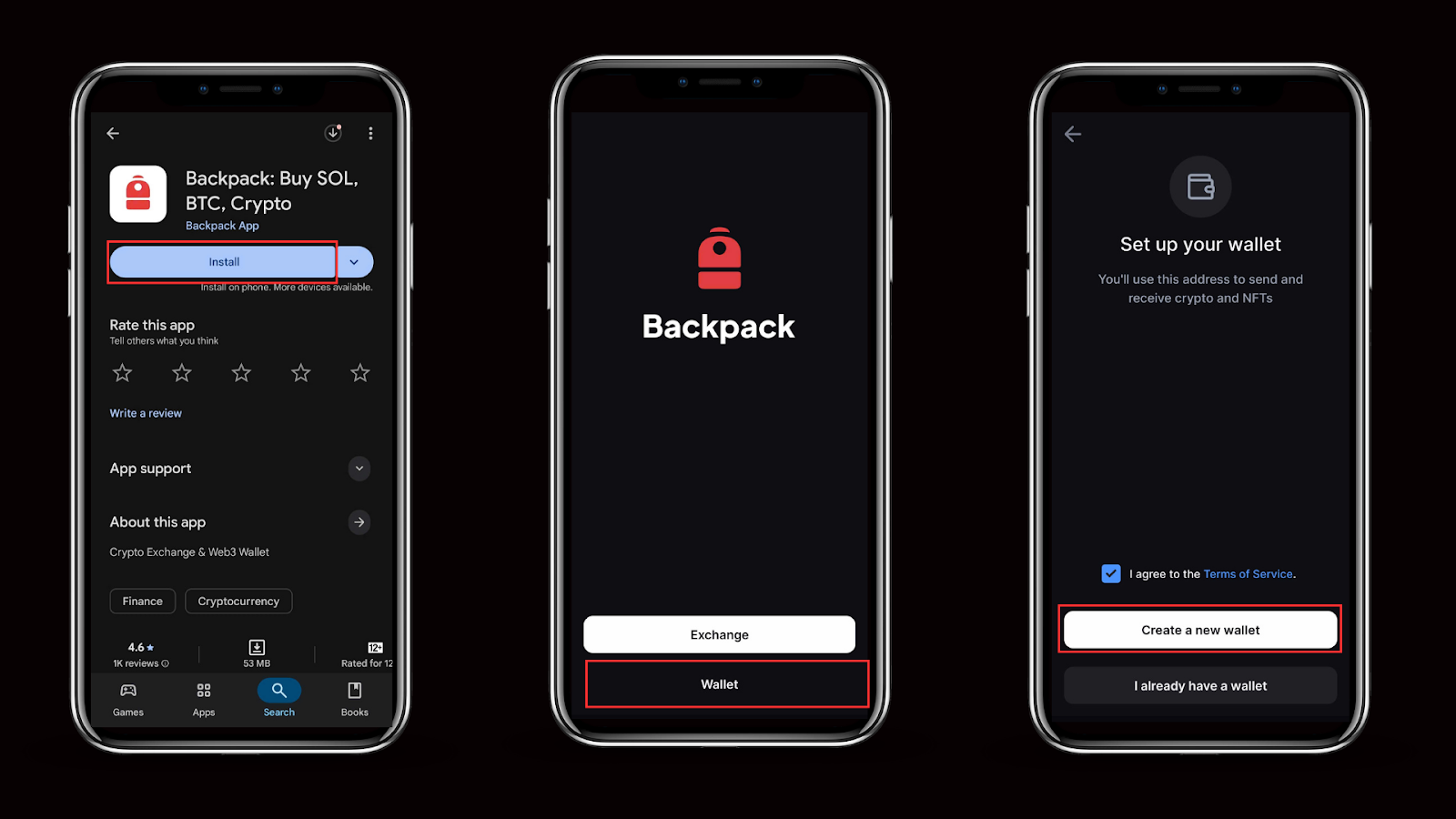
- Download Backpack Wallet
Go to the official Backpack website or app store and download Backpack Wallet for your device. Install the app or browser extension and open it.
- Create or Import Your Monad Wallet
When you open Backpack for the first time, choose to create a new wallet or import an existing one using your recovery phrase.
- Secure Your Recovery Phrase
Write down your recovery phrase and store it in a safe offline place.
Do not share it with anyone and do not store it in screenshots or cloud notes.

- Fund Your Wallet With MON
Send MON to your Backpack Monad address from an exchange or another wallet.
Keep a small amount of MON for gas fees so your swap can process successfully. - Open the Swap Feature
In Backpack Wallet, go to the Swap section.
This is where you can exchange MON for other supported tokens. - Select MON and the Token You Want to Receive
Set MON as the token you want to swap from.
Choose the token you want to receive, for example USDC or another supported asset on Monad.
Enter the amount of MON you want to swap or select Max to use your full available balance. - Review the Quote
Check the estimated amount you will receive, the exchange rate, and the network fee. Backpack charges 0% wallet-level swap fees, so the quote reflects the actual routing price from the liquidity source without additional wallet markups.
If everything looks correct, continue to the next step. - Confirm the Swap
Click Swap and then Confirm.
Backpack will send the transaction to the Monad network. The swap will usually complete very quickly. - Check Your Updated Balance
After the transaction confirms, your MON balance will decrease and the new asset will appear in your wallet.
You can review the full details under the Activity or transaction history section.

Common Issues and How to Fix Them
Users may experience issues when swapping, especially during busy network periods. Below are the most common problems and how to fix them.
Not enough MON for gas: Make sure you always keep a small amount of MON in your wallet. If gas is too low, the swap will fail.
Minimum swap amount not me: Some tokens require a minimum amount to proceed. Increase the amount slightly and try again.
Token not showing after swap: Refresh the wallet or wait a few seconds. If needed, re-add the token from the asset list.
Price impact too high: Large swaps may move the price if liquidity is low. Try swapping a smaller amount or wait for better liquidity.
Swap stuck or not processing:This usually indicates network congestion or insufficient gas. Check your balance and retry after a short wait.
Frequently Asked Questions
Can I swap MON without verification
Yes. Backpack Wallet is non-custodial, so no verification or KYC is required.
How long does a MON swap take
Swaps usually complete in less than a second due to Monad’s fast finality.
What tokens can MON be swapped into
Supported tokens depend on available liquidity and integrations. Options will expand as the Monad ecosystem grows.
Why is my MON swap not working
The most common reasons are insufficient gas, low liquidity, or minimum swap limits. Review the troubleshooting section above.
Do I need to add MON manually
MON appears automatically in Backpack Wallet since it is the native token of the network.
Do Monad swaps on Backpack charge extra fees?
No. Backpack Wallet does not add wallet-level swap fees when exchanging tokens. Users only pay the underlying network fee and any liquidity provider fee from the routing protocol.
Final Thoughts
Swapping Monad tokens on Backpack Wallet is fast, secure, and easy for users at every experience level. With native support for MON and the growing Monad ecosystem, Backpack provides a smooth way to convert between assets, manage your portfolio, and access new opportunities, with swaps executed directly inside the wallet without additional wallet-level swap fees. As Monad expands, more tokens and swap routes will be added, making Backpack the preferred wallet for MON holders.
Learn more about Backpack
Exchange | Wallet | Twitter | Discord
Disclaimer: This content is presented to you on an “as is” basis for general information and educational purposes only, without representation or warranty of any kind. It should not be construed as financial, legal or other professional advice, nor is it intended to recommend the purchase of any specific product or service. You should seek your own advice from appropriate professional advisors. Where the article is contributed by a third party contributor, please note that those views expressed belong to the third party contributor, and do not necessarily reflect those of Backpack. Please read our full disclaimer for further details. Digital asset prices can be volatile. The value of your investment may go down or up and you may not get back the amount invested. You are solely responsible for your investment decisions and Backpack is not liable for any losses you may incur. This material should not be construed as financial, legal or other professional advice.
了解更多关于Backpack的信息
交易所 | 钱包 | Twitter | Discord | Reddit
免责声明:本内容按“原样”提供,仅供一般信息和教育目的,不作任何形式的陈述或保证。不应将其解释为财务、法律或其他专业建议,也不旨在推荐购买任何特定产品或服务。您应向适当的专业顾问寻求自己的建议。如果文章由第三方贡献者提供,请注意,所表达的观点属于该第三方贡献者,不一定反映 Backpack 的观点。请阅读我们的完整免责声明以获取更多详情。数字资产价格可能波动剧烈。您的投资价值可能上涨或下跌,您可能无法收回投资金额。您对自己的投资决策负全部责任,Backpack 对您可能遭受的任何损失概不负责。本材料不应被解释为财务、法律或其他专业建议。
.avif)